EducationSoftwareStrategy.com
StrategyCommunity

Knowledge Base

Product

Community

Knowledge Base

TopicsBrowse ArticlesDeveloper Zone

Product

Download SoftwareProduct DocumentationSecurity Hub

Education

Tutorial VideosSolution GalleryEducation courses

Community

GuidelinesGrandmastersEvents
x_social-icon_white.svglinkedin_social-icon_white.svg
Strategy logoCommunity

© Strategy Inc. All Rights Reserved.

LegalTerms of UsePrivacy Policy
  1. Home
  2. Topics

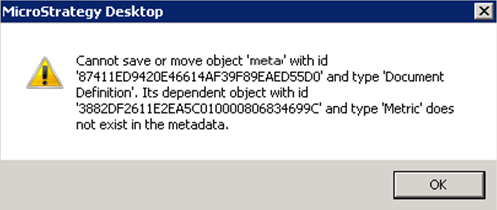
KB44238: "Cannot save or move object 'XYZ' with id 'XXX' and type 'Document Definition'. Its dependent object with id 'XXX' and type 'Metric' does not exist in the metadata" when saving a document in MicroStrategy Developer 10.x


Stefan Zepeda

Salesforce Solutions Architect • Strategy


SYMPTOM:
Whenever saving a document in Strategy Developer 10.x users receive the error below:
ka02R000000kcjDQAQ_0EM440000002CjV.png

CAUSE:
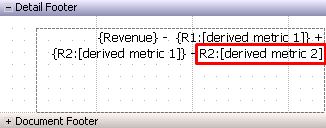
This occurs because there is dynamic text for a derived metric which does not have curly brackets around it {}.  When these are not around the dynamic text, it will complain about the derived metric not existing in the metadata.  In fact, this error is not incorrect as derived metrics are embedded objects which exist only within the datasets definition.
ka02R000000kcjDQAQ_0EM440000002CjP.png

ACTION:
Place curly brackets {} around the derived metrics dynamic text.
NOTE:  When metrics or derived metrics are clicked and dragged into the document as dynamic text, curly brackets are placed around them by default.


Comment

0 comments

Details

Knowledge Article

Published:

April 3, 2017

Last Updated:

April 3, 2017