Starting with the release of Strategy ONE (March 2024), dossiers are also known as dashboards.
SYMPTOM
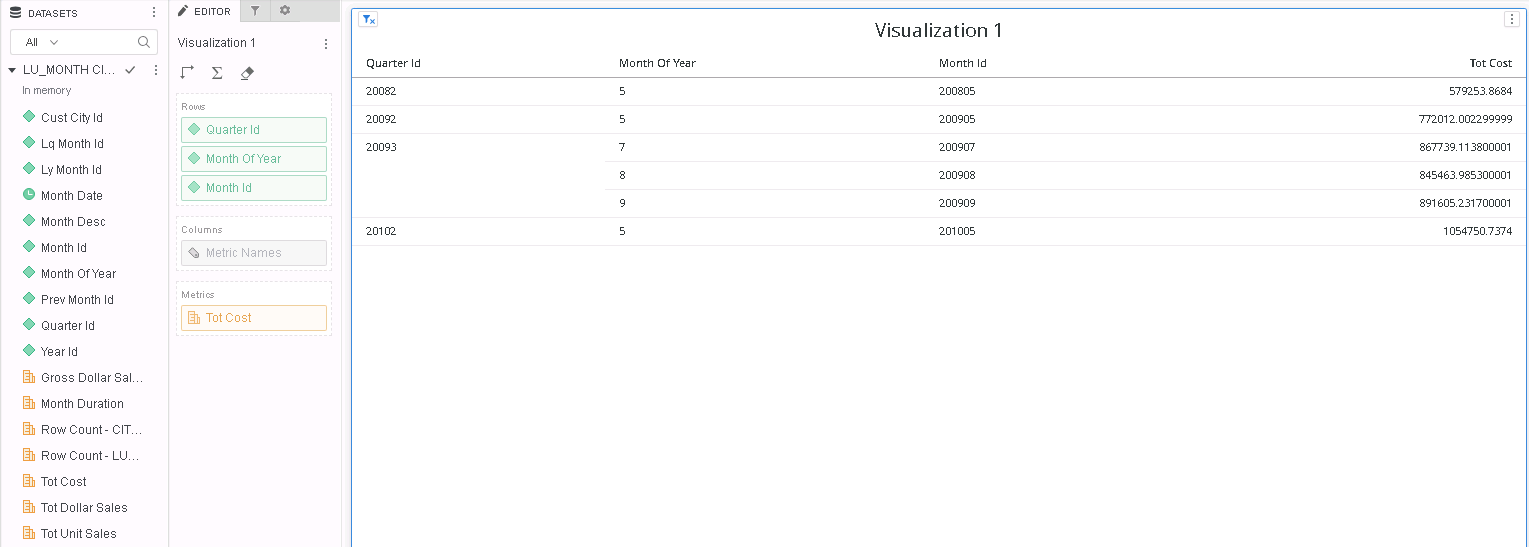
Attribute outer join with preserve filter does not show attribute elements for which there is no metric data available
STEPS TO REPRODUCE:
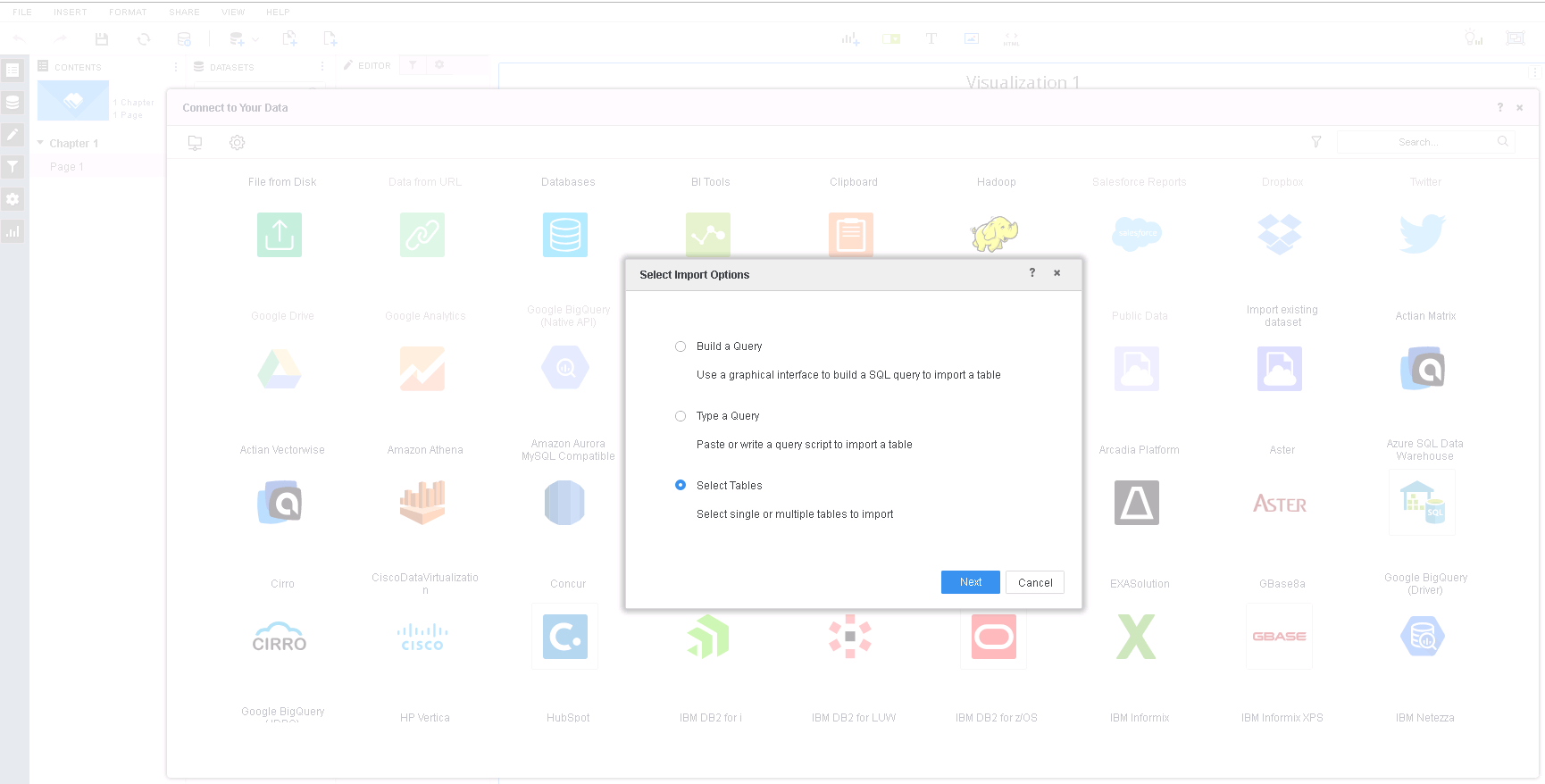
1. In Strategy Web, create a Dossier > New Data > Databases > Select Tables.
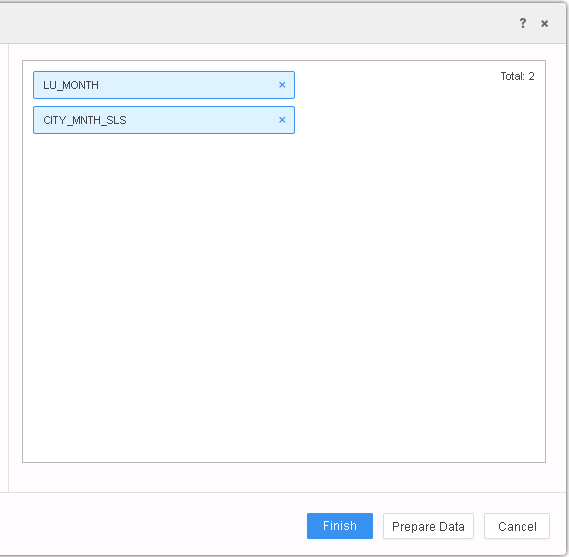
2. Select LU_MONTH, CITY_MNTH_SLS and click Prepare Data.
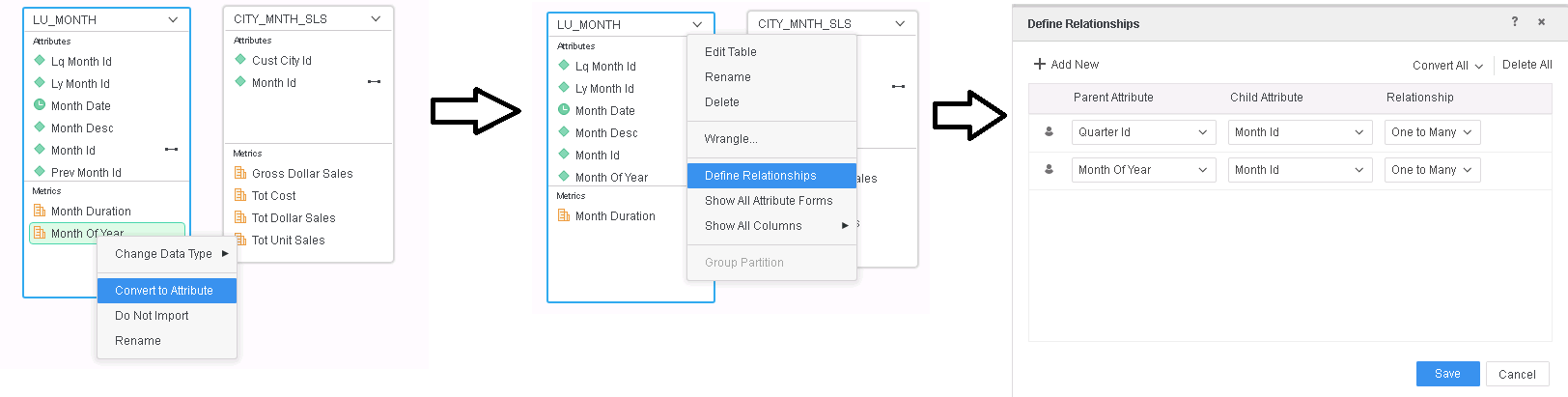
3. Change "Month Of Year" from metric to attribute by right mouse click on "Month Of Year" metric and selecting "Convert to Attribute" and then define relationship as mentioned below:
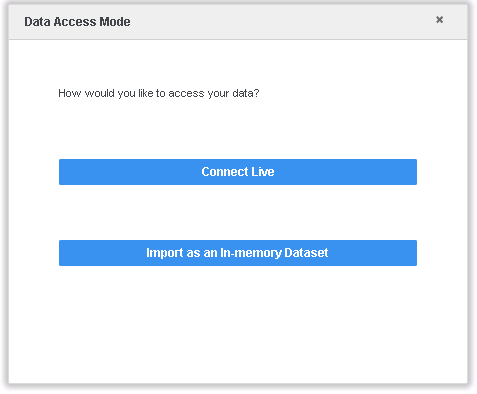
4. Click Finish and select "Import as an In-memory Dataset".
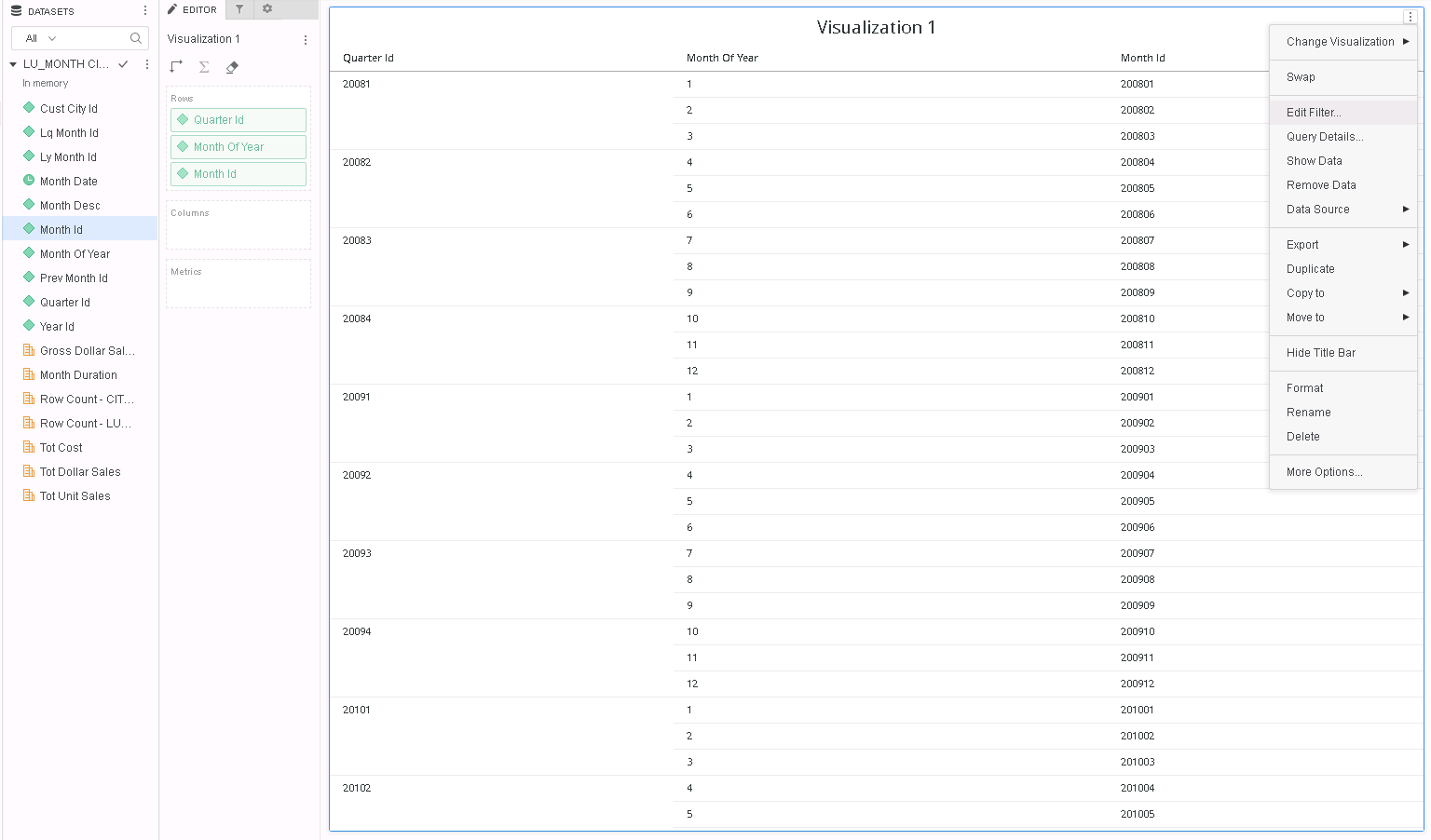
5. Put "Quarter Id", "Month Of Year", "Month Id" attributes on the visualization and select Edit Filter... option.
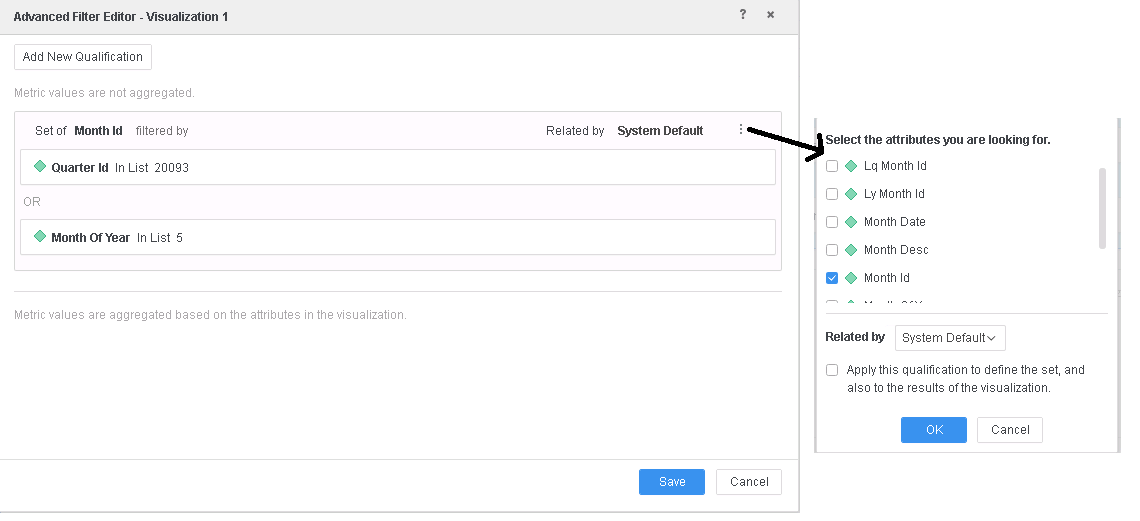
6. Define the filter like following and click Save.
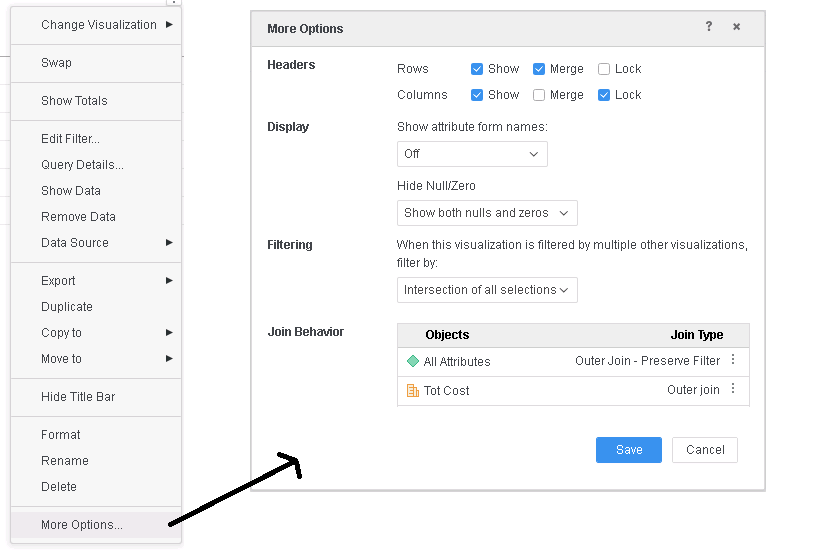
7. Go to visualization context menu and select More Options and select "Outer Join - Preserve Filter" option for "All Attributes" and click Save.
8. Note that only attribute elements with "Tot Cost" values are displayed.
Query Details also explains that the Attribute Outer Join is not correctly applied, in red below.
*********   Visualization Summary Start  **********
Time Spent: 0.009 sec(s)
Query Execution Start Time: 2/25/2019 5:05:29 PM
Query Execution End Time: 2/25/2019 5:05:29 PM

Note: The total 'Time Spent' above may be greater than the summation of the individual step execution times below.
There are preparation tasks for each step that are not individually measured.
*********   Visualization Summary End    **********


************   Individual Step Start   ************
Number of Rows Returned: 6
Time Spent: 0.007 sec(s)
Query Execution Start Time: 2/25/2019 5:05:29 PM
Query Execution End Time: 2/25/2019 5:05:29 PM

Tables Accessed:
Table10	[REL_QUARTER_ID_MONTH_ID]:	Quarter Id, Month Id, 		RELATIONSHIP_TABLE,	ONE_TO_MANY
Table11	[REL_MONTH_OF_YEAR_MONTH_ID]:	Month Of Year, Month Id, 		RELATIONSHIP_TABLE,	ONE_TO_MANY
Table12	[F_LU_MONTHF9F6C7C316926A9E722108384B215899]:	Year Id, Month Of Year, Quarter Id, Month Id, Month Date, Month Desc, Prev Month Id, Lq Month Id, Ly Month Id, 	Month Duration, Row Count - LU_MONTH, 	FACT_TABLE
Table13	[F_CITY_MNTH_SLSF9F6C7C316926A9E722792044B380343]:	Month Id, Cust City Id, 	Row Count - CITY_MNTH_SLS, Tot Dollar Sales, Tot Cost, Gross Dollar Sales, Tot Unit Sales, 	FACT_TABLE

select	[Month Id]@[MONTH_ID],
	[Month Of Year]@[MONTH_OF_YEAR],
	[Quarter Id]@[QUARTER_ID],
	sum([[F_CITY_MNTH_SLSF9F6C7C316926A9E722792044B380343].Tot Cost])@{[Month Id]} as [Tot Cost]
from	LU_MONTH CITY_MNTH_SLS (2 tables)
with Table Join Tree: 	[F_CITY_MNTH_SLSF9F6C7C316926A9E722792044B380343]
	 Join (Set of distinct Tuple([Month Id]@[MONTH_ID]) where Tuple([Month Id]@[MONTH_ID]) in [F_LU_MONTHF9F6C7C316926A9E722108384B215899]<([Quarter Id]@[QUARTER_ID] in (20093)
 or [Month Of Year]@[MONTH_OF_YEAR] in (5))>) with output level Tuple([Month Id]@[MONTH_ID], [Cust City Id]@[CUST_CITY_ID])
	 Join [REL_MONTH_OF_YEAR_MONTH_ID] with output level Tuple([Month Id]@[MONTH_ID], [Month Of Year]@[MONTH_OF_YEAR], [Cust City Id]@[CUST_CITY_ID])
	 Join [REL_QUARTER_ID_MONTH_ID] with output level Tuple([Month Id]@[MONTH_ID], [Month Of Year]@[MONTH_OF_YEAR], [Quarter Id]@[QUARTER_ID], [Cust City Id]@[CUST_CITY_ID]) <([Quarter Id]@[QUARTER_ID] in (20093)
 or [Month Of Year]@[MONTH_OF_YEAR] in (5))>
Save As TempTable14

select	[Month Id]@[MONTH_ID],
	[Month Of Year]@[MONTH_OF_YEAR],
	[Quarter Id]@[QUARTER_ID],
	[TempTable14.Tot Cost] as [Tot Cost]
from	LU_MONTH CITY_MNTH_SLS (2 tables)
with Table Join Tree: 	[REL_QUARTER_ID_MONTH_ID]
	 Join [REL_MONTH_OF_YEAR_MONTH_ID] with output level Tuple([Month Id]@[MONTH_ID], [Month Of Year]@[MONTH_OF_YEAR], [Quarter Id]@[QUARTER_ID])
	 Join (Set of Tuple([Month Id]@[MONTH_ID]) where Tuple([Month Id]@[MONTH_ID]) in TempTable14<([Quarter Id]@[QUARTER_ID] in (20093)
 or [Month Of Year]@[MONTH_OF_YEAR] in (5))>) with output level Tuple([Month Id]@[MONTH_ID], [Month Of Year]@[MONTH_OF_YEAR], [Quarter Id]@[QUARTER_ID])
	 LeftOuterJoin TempTable14 with output level Tuple([Month Id]@[MONTH_ID], [Month Of Year]@[MONTH_OF_YEAR], [Quarter Id]@[QUARTER_ID])
************   Individual Step End     ************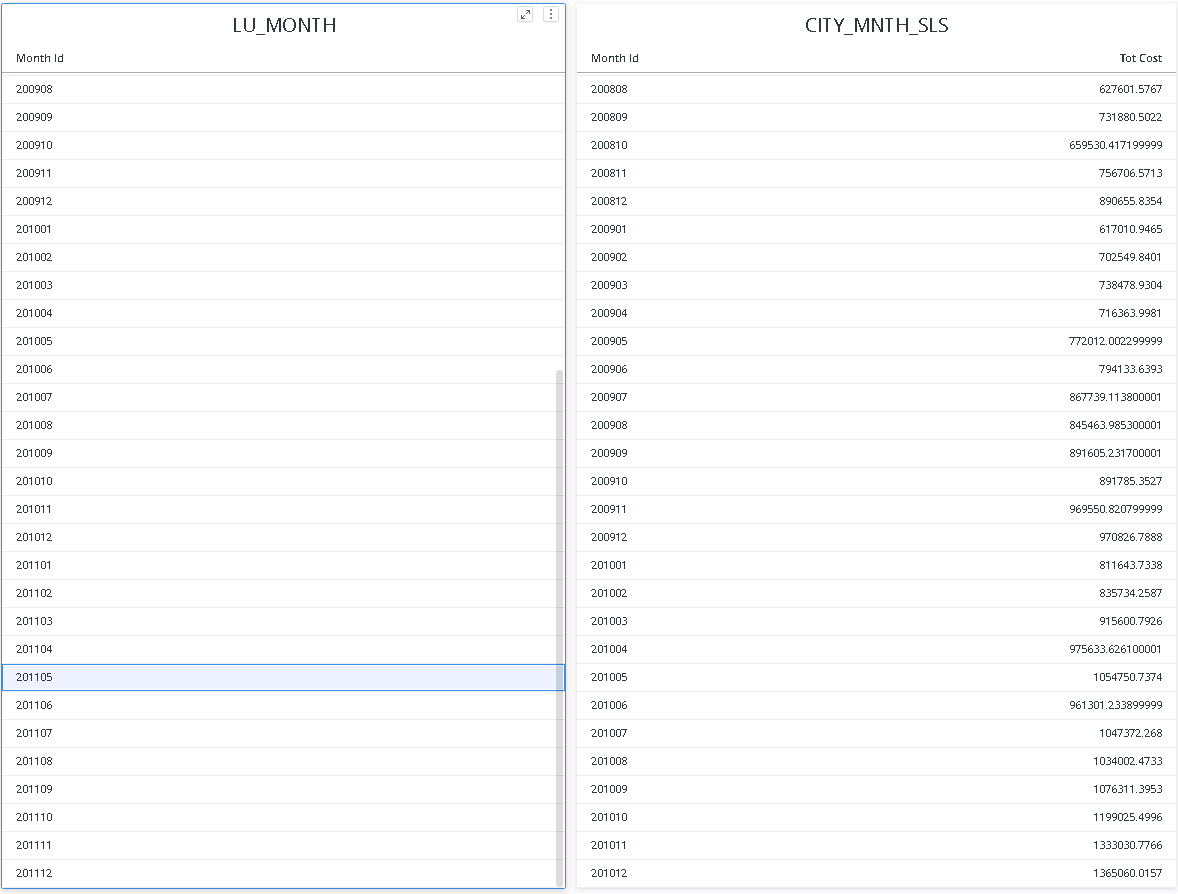
CAUSE
This is a known issue in Strategy 10.11 and above.
ACTION
This issue has been addressed in Strategy 11.0.
If you are upgrading to Strategy 11.0 or above, to pick up the fix, enable project level setting "Data Engine Version" to 11. This property can only be enabled through Workstation. For more details on enabling the setting, refer to Change Data Engine Version.
The Attribute Outer Join setting works and displays the additional qualifying attribute element too (last row in visualization).
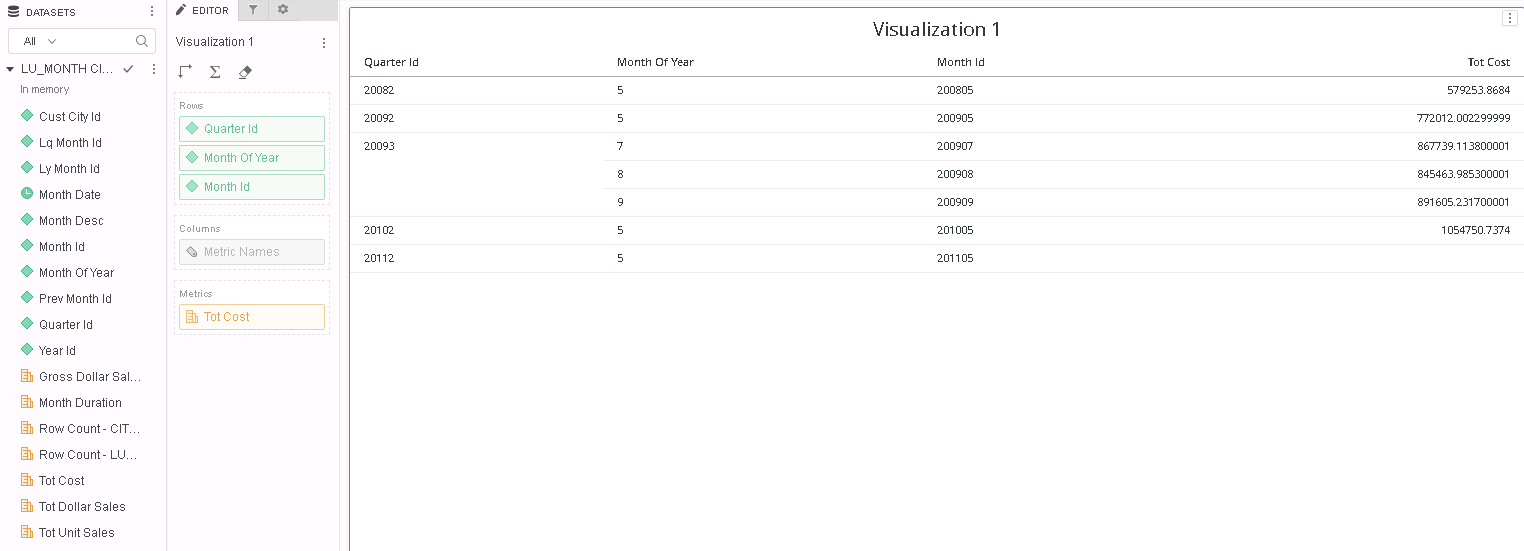
Query Details also explains that the Attribute Outer Join is correctly applied, in blue below.
*********   Visualization Summary Start  **********
Time Spent: 0.007 sec(s)
Query Execution Start Time: 2/25/2019 5:29:09 PM
Query Execution End Time: 2/25/2019 5:29:09 PM

Note: The total 'Time Spent' above may be greater than the summation of the individual step execution times below.
There are preparation tasks for each step that are not individually measured.
*********   Visualization Summary End    **********


************   Individual Step Start   ************
Number of Rows Returned: 7
Time Spent: 0.006 sec(s)
Query Execution Start Time: 2/25/2019 5:29:09 PM
Query Execution End Time: 2/25/2019 5:29:09 PM

Tables Accessed:
Table10	[REL_QUARTER_ID_MONTH_ID]:	Quarter Id, Month Id, 		RELATIONSHIP_TABLE,	ONE_TO_MANY
Table11	[REL_MONTH_OF_YEAR_MONTH_ID]:	Month Of Year, Month Id, 		RELATIONSHIP_TABLE,	ONE_TO_MANY
Table12	[F_LU_MONTHF9F6C7C316926A9E722108384B215899]:	Year Id, Month Of Year, Quarter Id, Month Id, Month Date, Month Desc, Prev Month Id, Lq Month Id, Ly Month Id, 	Month Duration, Row Count - LU_MONTH, 	FACT_TABLE
Table13	[F_CITY_MNTH_SLSF9F6C7C316926A9E722792044B380343]:	Month Id, Cust City Id, 	Row Count - CITY_MNTH_SLS, Tot Dollar Sales, Tot Cost, Gross Dollar Sales, Tot Unit Sales, 	FACT_TABLE

select	[Month Id]@[MONTH_ID],
	[Month Of Year]@[MONTH_OF_YEAR],
	[Quarter Id]@[QUARTER_ID],
	sum([[F_CITY_MNTH_SLSF9F6C7C316926A9E722792044B380343].Tot Cost])@{[Month Id]} as [Tot Cost]
from	LU_MONTH CITY_MNTH_SLS (2 tables)
with Table Join Tree: 	[F_CITY_MNTH_SLSF9F6C7C316926A9E722792044B380343]
	 Join (Set of distinct Tuple([Month Id]@[MONTH_ID]) where Tuple([Month Id]@[MONTH_ID]) in [F_LU_MONTHF9F6C7C316926A9E722108384B215899]<([Quarter Id]@[QUARTER_ID] in (20093)
 or [Month Of Year]@[MONTH_OF_YEAR] in (5))>) with output level Tuple([Month Id]@[MONTH_ID], [Cust City Id]@[CUST_CITY_ID])
	 Join [REL_MONTH_OF_YEAR_MONTH_ID] with output level Tuple([Month Id]@[MONTH_ID], [Month Of Year]@[MONTH_OF_YEAR], [Cust City Id]@[CUST_CITY_ID])
	 Join [REL_QUARTER_ID_MONTH_ID] with output level Tuple([Month Id]@[MONTH_ID], [Month Of Year]@[MONTH_OF_YEAR], [Quarter Id]@[QUARTER_ID], [Cust City Id]@[CUST_CITY_ID])
Save As TempTable14

select	[Month Id]@[MONTH_ID],
	[Month Of Year]@[MONTH_OF_YEAR],
	[Quarter Id]@[QUARTER_ID],
	[TempTable14.Tot Cost] as [Tot Cost]
from	LU_MONTH CITY_MNTH_SLS (2 tables)
with Table Join Tree: 	[REL_QUARTER_ID_MONTH_ID]
	 Join [REL_MONTH_OF_YEAR_MONTH_ID] with output level Tuple([Month Id]@[MONTH_ID], [Month Of Year]@[MONTH_OF_YEAR], [Quarter Id]@[QUARTER_ID])
	 Join (Set of distinct Tuple([Month Id]@[MONTH_ID]) where Tuple([Month Id]@[MONTH_ID]) in [F_LU_MONTHF9F6C7C316926A9E722108384B215899]<([Quarter Id]@[QUARTER_ID] in (20093)
 or [Month Of Year]@[MONTH_OF_YEAR] in (5))>) with output level Tuple([Month Id]@[MONTH_ID], [Month Of Year]@[MONTH_OF_YEAR], [Quarter Id]@[QUARTER_ID])
	 LeftOuterJoin TempTable14 with output level Tuple([Month Id]@[MONTH_ID], [Month Of Year]@[MONTH_OF_YEAR], [Quarter Id]@[QUARTER_ID])
************   Individual Step End     ************