EducationSoftwareStrategy.com
StrategyCommunity

Knowledge Base

Product

Community

Knowledge Base

TopicsBrowse ArticlesDeveloper Zone

Product

Download SoftwareProduct DocumentationSecurity Hub

Education

Tutorial VideosSolution GalleryEducation courses

Community

GuidelinesGrandmastersEvents
x_social-icon_white.svglinkedin_social-icon_white.svg
Strategy logoCommunity

© Strategy Inc. All Rights Reserved.

LegalTerms of UsePrivacy Policy
  1. Home
  2. Topics

KB44239: Nulls appear in graphs even after setting the Null display setting to show 0 within the Report Data Options -> Display -> Null Values for MicroStrategy Developer 9.x.


Stefan Zepeda

Salesforce Solutions Architect • Strategy


Nulls appear in graphs even after setting the Null display setting to show 0 within the Report Data Options -> Display -> Null Values for MicroStrategy Developer 9.x.

SYMPTOM:
 
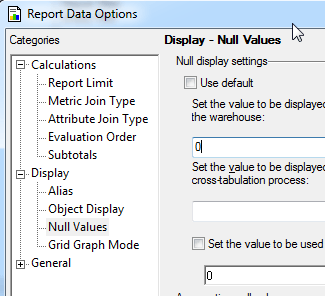
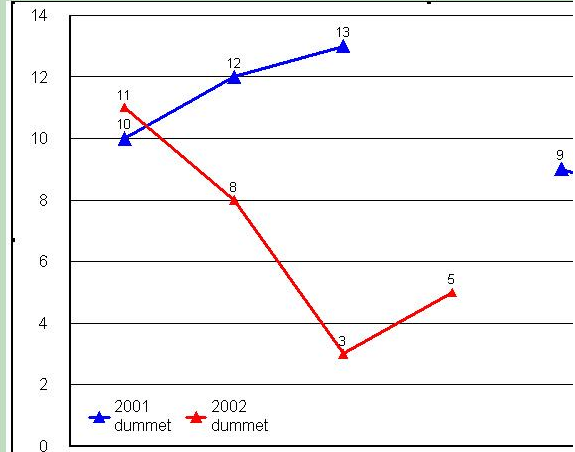
Even though users set the null display to show zero's within Data -> Report Data Options -> Display -> Null Values and this setting gets applied correctly to grids, graphs still show nulls rather than being represented by a zero as the following screenshots show:
 

ka02R000000kboWQAQ_0EM440000002CjD.png

 
In this graph notice the absence of a blue line betwee the 13 and 9 data points:
 

ka02R000000kboWQAQ_0EM440000002Cj9.png

 
CAUSE:
 
This is because the ability to deal with nulls (display zero instead of null) within a graph is handled through a separate option. 
 
ACTION:
 
This can be set at either the Report or Project Level.
 
To set it at the Report level:

  1. Right click the graph and select Graph Options
  2. Navigate to Options -> General -> "Use zero instead of null values"
  3. Change the drop down to "Yes"

To set this at the Project level:

  1. Right click the project and select Project Configuration
  2. Navigate to Report Definition -> Graph "Use zero instead of null values"
  3. Select the check box

 
NOTE:  If set within the Project Configuration, this value will now be the default behavior for all graph reports in the project.


Comment

0 comments

Details

Knowledge Article

Published:

June 8, 2017

Last Updated:

June 8, 2017