Starting with the release of Strategy ONE (March 2024), dossiers are also known as dashboards.
Description
In Strategy 2019, when saving a dossier to the Intelligence Server from Workstation, user/password info will be kept by default while token is removed. When dossier is later opened, "No access token provided: error appears.
In Strategy 2019, when creating dossiers with sources which are authenticated by Refresh Token, Access Token or Client Secret, secret values are removed from the connection string for security concern. If the token is stored in the connection string, the .mstr file can retain the data without any authenticating steps.
The behavior change may impact following sources when performing Import / Export .MSTR files:
Before Strategy 2019:
Secret info is carried along with .mstr files and when the file is opened on another platform, data is directly seen without authentication steps.
Since Strategy 2019:
Secret info is removed from .mstr files and user will be asked for credentials when opening the dossier.
It behaves differently in below scenarios:
Why is this happening?
1. In connection string , the following keys are being removed:
RefreshToken , OAuthRefreshToken , Auth_AccessToken , Auth_Client_Secret , Auth_RefreshToken
Example (Concur DB):
Old .mstr files:
Connection string stored is:
JDBC;DRIVER={com.Strategy.concur.jdbc42.CLJDBCDriver};URL={jdbc:concur://;Host=concursolutions.com;Auth_Type=OAuth 2.0;Auth_RefreshToken=0_Nye*****************;Auth_Client_ID=reta3CLmP6gIbt2OBQXqOc;Auth_Client_Secret=Y1J****************}
Export a new .mstr file, from the connection string that the keys for "Auth_RefreshToken" and "Auth_Client_Secret" are both cleared:
JDBC;DRIVER={com.Strategy.concur.jdbc42.CLJDBCDriver};URL={jdbc:concur://;Host=concursolutions.com;Auth_Type=OAuth 2.0;Auth_RefreshToken=;Auth_Client_ID=reta3CLmP6gIbt2OBQXqOc;Auth_Client_Secret=}
When import a .mstr file whose token has been removed.
For Live Dossiers, user will be asked for credentials once opening the dossier.
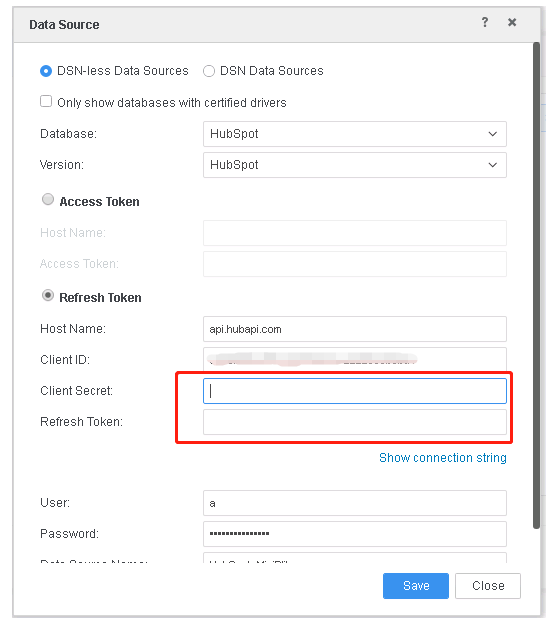
The fields for "Access Token”, "Refresh Token" and "Client Secret" are needed besides "User" , "Password".
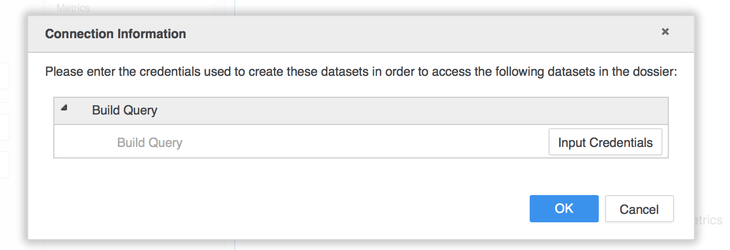

For In-Mem Dossiers, data is stored with .mstr file and dossier can be executed successfully without asking for credentials. User will be asked for credentials when republishing cube.


When users edit a DB role, connection info is viewable, the token and client secret are hidden from interface.
Note: Users can still connect to the source but any modifications that will be saved in this DB role definition will require the fields for tokens and client secrets to be filled again.
Solution
Option 1
Upgrade to Strategy 11.1 to take advantage of the fix.
Option 2
Alternatively, in Strategy 2019:
1. In visualization page, click "Edit Dataset" and go to Data Modeling page.
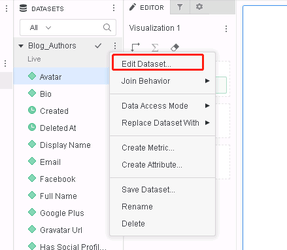
2. Click the drop-down button and click "Edit Table", to Data Import page.

3. In Data Import page, click the "Edit" button to DB role.

4. Edit DB Role and manually input the information.
Have other questions? Feel free to start a discussion or reach out to your Support liaison to open a case!
Want to upgrade to Strategy 2019? Visit the Strategy website!
