EducationSoftwareStrategy.com
StrategyCommunity

Knowledge Base

Product

Community

Knowledge Base

TopicsBrowse ArticlesDeveloper Zone

Product

Download SoftwareProduct DocumentationSecurity Hub

Education

Tutorial VideosSolution GalleryEducation courses

Community

GuidelinesGrandmastersEvents
x_social-icon_white.svglinkedin_social-icon_white.svg
Strategy logoCommunity

© Strategy Inc. All Rights Reserved.

LegalTerms of UsePrivacy Policy
  1. Home
  2. Topics

KB442407: Information window does not display data when using (All) in the Group-by in MicroStrategy Web 10.x


Shane Winslow

Cloud Support Expert I • MicroStrategy


This knowledge base article describes the defect where the information window does not display data when using (All) in the Group-by in MicroStrategy Web 10.x. This defect is fixed in MicroStrategy Web 11.0.

SYMPTOM
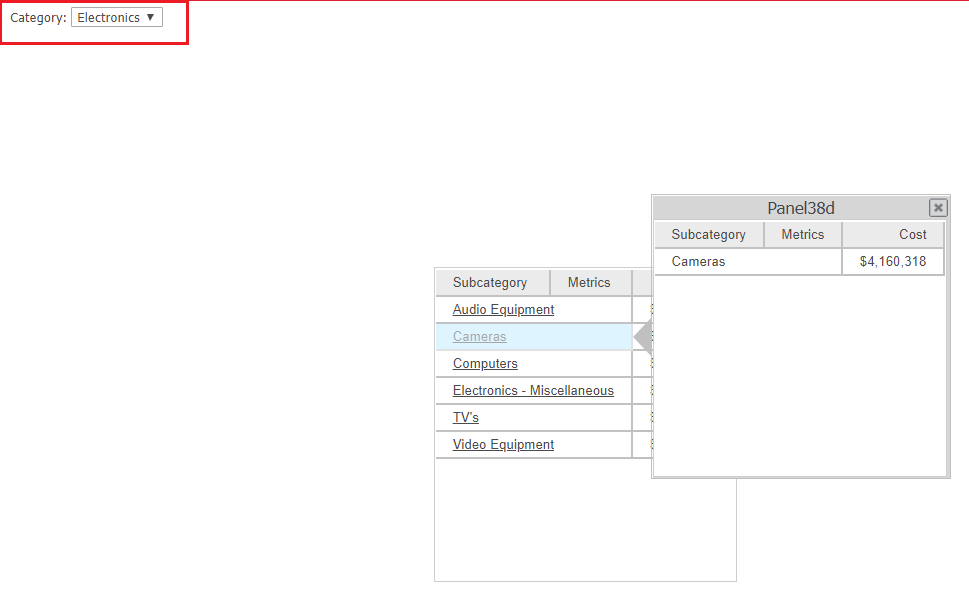
In Strategy Web 10.x, the page-by feature can be used to group data into subsets, making it easier for end users to consume the data by viewing logical subsets. In a report services document, an information window can then be triggered based on the subset as shown below.
ka044000000kPhQAAU_0EM44000000RXAk.png

 
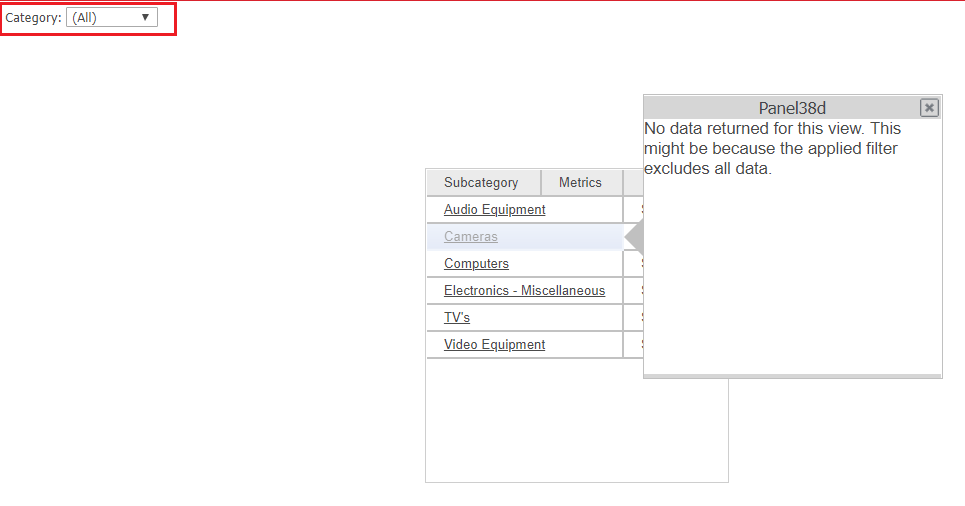
However, if “(All)” is selected in the group-by field, the information window shows the following message when triggered as seen below.
 
No data returned for this view. This might be because the applied filter excludes all data.
ka044000000kPhQAAU_0EM44000000RXAu.png

STEPS TO REPRODUCE

  1. Create a report with Category, Subcategory, and Cost.
  2. Create a document and add the report from step 1.
  3. Add Category to the Grouping section.
  4. In the Category Header section of the document, add a grid with Subcategory and Cost.
  5. Insert a panel stack to the Category Header section.
  6. Add a grid to the panel stack containing Subcategory and Cost.
  7. Right-click on the standalone grid and click "Use as selector".
  8. Right-click on Subcategory in the standalone grid and choose "Edit selector..."
  9. Select the Panel Stack in the Information Windows section.
  10. Click OK.
  11. Run the document to Presentation mode.
  12. Select (All) in the group-by.
  13. Click on elements in the first grid. Notice the information renders and shows data.
  14. Click on elements in the other grids. Notice the information window shows the message "No data returned for this view. This might be because the applied filter excludes all data."


CAUSE
This is an identified defect in Strategy Web 10.x.
 
ACTION
This issue has been addressed in Strategy Web 11.0. Upgrade to this version or later to take advantage of this fix.
 
 
Article Reference Number:    KB442407


Comment

0 comments

Details

Knowledge Article

Published:

December 18, 2018

Last Updated:

January 1, 2019