EducationSoftwareStrategy.com
StrategyCommunity

Knowledge Base

Product

Community

Knowledge Base

TopicsBrowse ArticlesDeveloper Zone

Product

Download SoftwareProduct DocumentationSecurity Hub

Education

Tutorial VideosSolution GalleryEducation courses

Community

GuidelinesGrandmastersEvents
x_social-icon_white.svglinkedin_social-icon_white.svg
Strategy logoCommunity

© Strategy Inc. All Rights Reserved.

LegalTerms of UsePrivacy Policy
  1. Home
  2. Topics

KB442418: "Arithmetic overflow error for data type tinyint, value = -1" error occurs when Data Load fails in MicroStrategy Enterprise Manager.


Community Admin

• Strategy


This Knowledge Base article describes when MicroStrategy Enterprise Manager Data Load fails. The MicroStrategy DSSError logs show "Arithmetic overflow error for data type tinyint, value = -1". This is an identified defect and a workaround is provided.

SYMPTOM
An administrator schedules the data load task for Strategy Enterprise Manager 10.x in order to perform analysis on the usage of Strategy. Upon completion of the data load task, the administrator notices that the Strategy Enterprise Manager project is missing recent data. One of the reasons could be that last data load failed.
As a troubleshooting step, the administrator uses the following Strategy Command Manager 10.x script to determine the status of of the last data load job.


LIST PROPERTIES FOR LAST DATA LOAD IN ENTERPRISE MANAGER "localhost" IN PORT 9999;
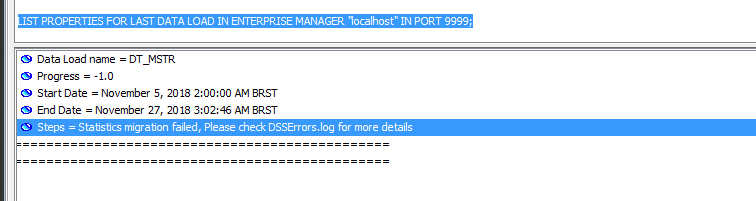
The status reported in Strategy Command Manager is shown in the screenshot below:

ka04W00000148nSQAQ_0EM44000000RYpA.png


Progress = -1.0 
Steps  = Statistics migration failed, Please check DSSErros.log for more details

Note: as explained in article KB439767, a Progress status of -1.0 indicates a failed data load.
Since the recommendation in the steps are to check the Strategy DSSError logs, the administrator then finds the DSSErros.log in the Strategy Intelligence Server machine and finds the following error at  the time the data load failed.

2018-12-13 11:34:50.385 [HOST:XXXX1011][SERVER:][PID:4548][THR:4572][Database Classes][Error] Execute Query failed. 
Error type: Odbc error. Odbc operation attempted: SQLExecDirect. [22003:220: on SQLHANDLE] [Strategy][ODBC SQL Server Wire Protocol driver][Microsoft SQL Server]Arithmetic overflow error for data type tinyint, value = -1. 
2018-12-13 11:34:50.617 [HOST:XXXX1011][SERVER:][PID:4548][THR:4572][Database Classes][Error] Execute Query failed.

CAUSE
This is an identified defect in Strategy Enterprise Manager 10.x.
During the data load process, several tables are being migrated between each other. For instance, table STG_IS_REPORT_STATS is migrating into table IS_REPORT_STATS.
The STG_IS_REPORT_STATS table has a Stepcount column whose type is 'int'. But the Stepcount column type in the IS_REPORT_STATS table is 'tinyint'. Tinyint does not allow a value of '-1'. Anytime the Stepcount column encounters a value of '-1' in STG_IS_REPORT_STATS table, this error will occur and the data load will fail.

ACTION
This issue has been addressed in Strategy Enterprise Manager 2019. Upgrade to this version to take advantage of this fix.
WORKAROUND
Using Strategy DB Query 10.x tool, execute the following command to find all the rows for Stepcount that contain the value of '-1':

SQL: SELECT * FROM XXX.STG_IS_REPORT_STATS WHERE STEPCOUNT=-1;

Then either delete them ro change their value from '-1' to '0', or some other value. The following SQL can be used to update the values to '0'.

SQL: UPDATE STG_IS_REPORT_STATS set STEPCOUNT=0 where stepcount='-1';

The Strategy Internal Reference Number for this issue is: KB442418


Comment

0 comments

Details

Knowledge Article

Published:

December 28, 2018

Last Updated:

December 28, 2018