There are multiple components and services replying on Strategy Messaging Services. For background, we will give a brief introduction about each component/service first.
There are two ways to setup Messaging Services Cluster. One way is to use Strategy Installation, another way is manual setup.
Here are the instructions for how to setup messaging services cluster, the steps on windows and linux are almost the same.
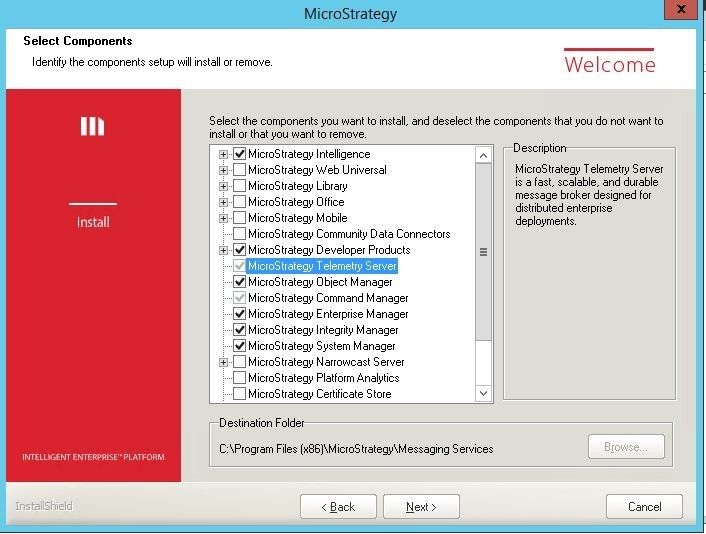
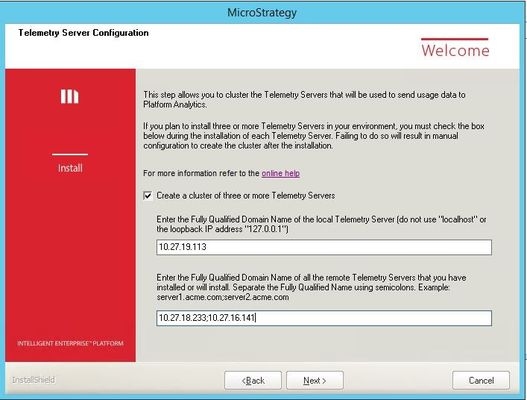
After Installing Telemetry on each of the nodes listed above, all the nodes will be joined into a cluster without any manual configuration.
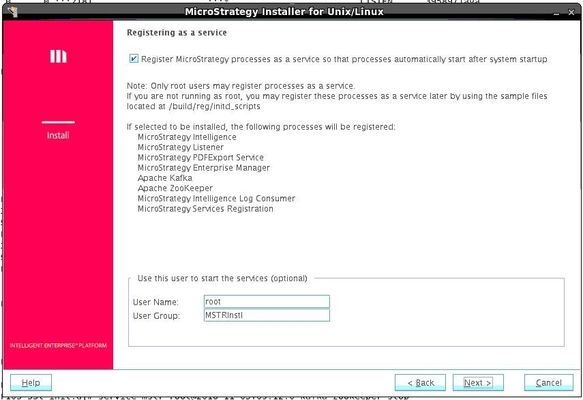
Note: If the administrator runs the Strategy Installer as root on Linux, then Messaging Services will be registered as a service named "mstr-<InstallName>-kafka-zookeeper" after ticking the check box "Register Strategy processes as a service so that processes automatically start after system startup". The "InstallName" is in MSIReg.reg file in the installation folder, under [HKEY_LOCAL_MACHINE\SOFTWARE\MicroStrategy\DSS Suite], the format is like "<user>@<date>T<time>". You also can even rename the service, or manually copy the <Install path>/kafka-zookeeper file to /etc/init.d after installation. Then you can start, stop and check Messaging Services by one command: service kafka-zookeeper start/stop/status .