Starting with the release of Strategy ONE (March 2024), dossiers are also known as dashboards.
Derived elements like derived attributes and derived metrics are calculated on the fly by the Strategy Analytical Engine, even when the data is coming from an intelligent cube, Strategy still needs to calculate the derived elements and depending on the data size and complexity sometimes these calculations can take minutes.
Based on the previous explanation, you should only create derived attributes or metrics whenever you require them based on the business definition, whenever possible define all attributes and metrics in the intelligent cube or in the Strategy schema and application objects. This can cause your intelligent cube or report execution time to grow, however the end user performance will be improved.
For instance, let’s say you have an Intelligent Cube with 2 million rows and 10 attributes and 5 metrics and the publishing time of this cube is 1 hour, then you use this cube in a Dossier and create 15 derived attributes and 15 derived metrics. The execution time of the Dossier is taking 1 minute which is not acceptable for the end user, they want this Dossier to run in less than 10 seconds.
Within the same example, if you define the 15 derived attributes and 15 derived metrics in the Intelligent Cube, the cube publishing time may increase, let’s say now it’s taking 1 hour and 20 minutes to be published, however the Dossier execution time without all these extra calculations on the run time (derived attributes and metrics) is now taking 5 seconds.
In the previous example all the extra calculations were pushed to the intelligent cube which will improve the performance for the end users.
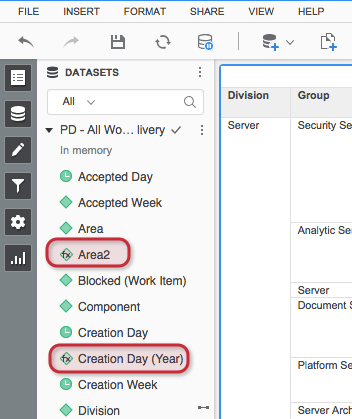
To identify the derived elements in Dossier, you just have to take a look at the datasets section of the Dossier.
For derived metrics you’ll see the fx icon on them:

For derived attributes you’ll also see the fx icon on them:
KB442430
