EducationSoftwareStrategy.com
StrategyCommunity

Knowledge Base

Product

Community

Knowledge Base

TopicsBrowse ArticlesDeveloper Zone

Product

Download SoftwareProduct DocumentationSecurity Hub

Education

Tutorial VideosSolution GalleryEducation courses

Community

GuidelinesGrandmastersEvents
x_social-icon_white.svglinkedin_social-icon_white.svg
Strategy logoCommunity

© Strategy Inc. All Rights Reserved.

LegalTerms of UsePrivacy Policy
  1. Home
  2. Topics

KB442442: Considerations for comparing data with Report Services Documents and Dossiers in Integrity Manager


Community Admin

• Strategy


There are numerous settings which need to be taken into consideration when comparing data in Integrity Manager.

Starting with the release of Strategy ONE (March 2024), dossiers are also known as dashboards.
Starting in 11.0, Strategy introduced the ability to compare data for Report Services Documents (RSD) and dossiers in Integrity Manager. These content objects are able to use multiple datasets which may additively account for a lot of cells to be processed, and therefore limits exist. 
Currently, for every grid or visualization in an RSD or dossier, Integrity Manager supports comparing at most 10,000 data rows. If it exceeds this limit, only the first 10,000 will be fetched, compared, and rendered. In future, Strategy is working towards increasing this limit to work towards comparing more and more data.
Integrity Manager is also restricted by the following Intelligence Server limits:
Maximum memory consumption for XML:

  • Integrity Manager fetches data from the Intelligence Server in XML format. Based on the RSD/dossier structure, a single request can include multiple grids and visualizations.
  • The default limit for Strategy 2019 is 512MB, 95MB for previous releases. 
  • When the limit is reached, an error message will print in the Detail panel:

Strategy Intelligence Server cannot handle your request because a memory request has exceeded the configured limit. Please contact the server administrator.
 

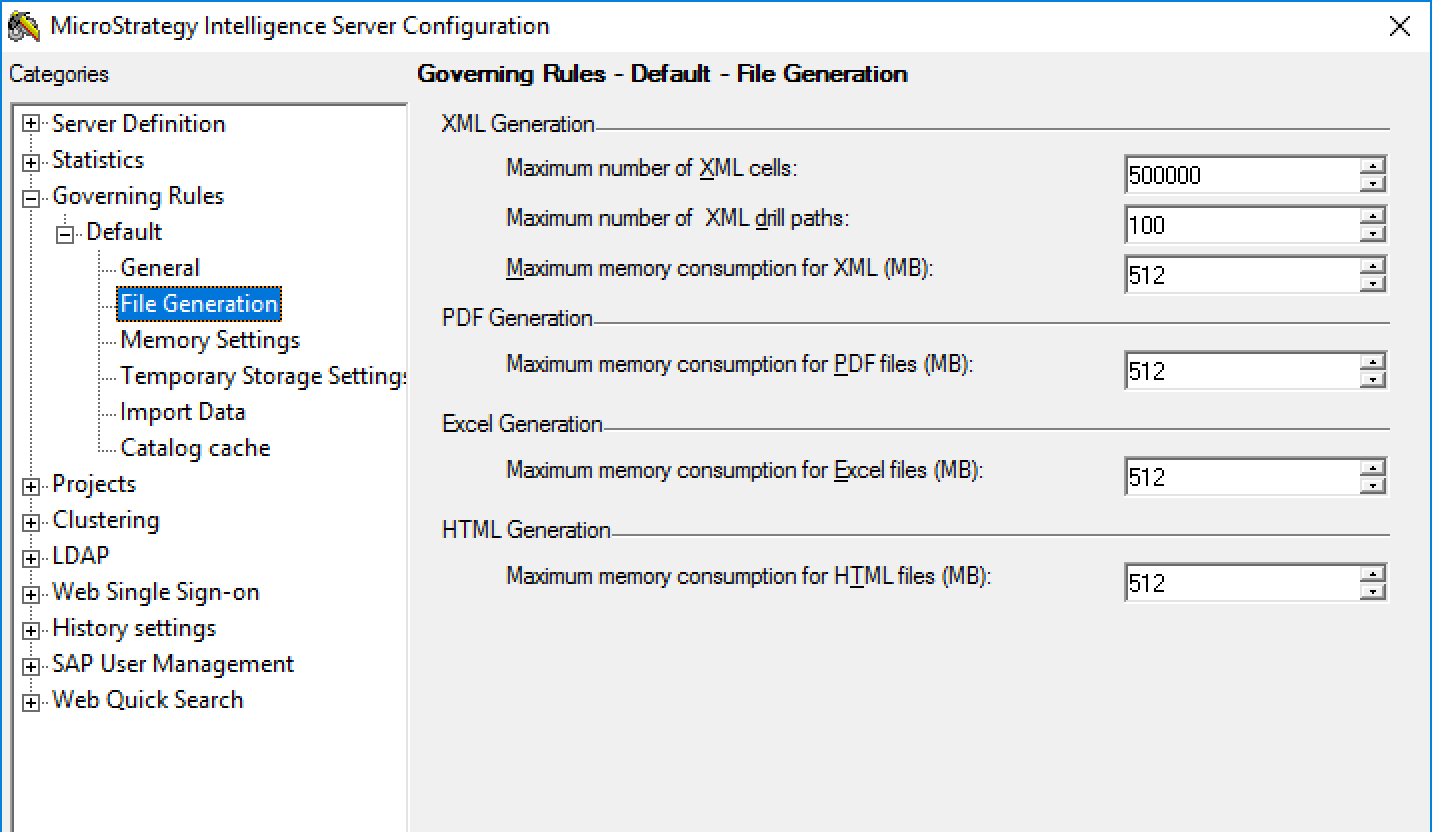
  • Administrators can edit this governing setting via Developer by going to Server Configuration -->Governing Rules->File Generation->Maximum memory consumption for XML(MB) to modify this setting if they are receiving this error and have the capacity to increase it. The maximum value of this property is 2047(MB).

 
Maximum number of XML cells:

  • For 11.0, Integrity Manager uses a hidden setting to limit the maximum number of metric value cells for each XML response, with the default value is 1,000,000.
  • For Strategy 2019, Integrity Manager uses the "Maximum number of XML cells" setting exposed via Developer by going to Server Configuration -->Governing Rules->File Generation-->Maximum number of XML cells). The default value for pre-2019 server definitions is 500,000 and 1,000,000 for Strategy 2019. The maximum value of this property is 99,999,999.
     
ka0PW0000001JVFYA2_0EM44000000RaDl.png
  • For reports, data is fetched incrementally 500 rows at a time. If the total number of cells (rows x columns) on each page reaches or exceeds “Maximum number of XML cells,” then although all columns will be used, only a subset of results are fetched to be compared and displayed determined by "Maximum number of XML cells"/columns. 
  • For documents and dossiers, the maximum number of rows that will be fetched and compared is 10,000. If the total number of cells (rows x columns) on each page reaches or exceeds the “Maximum number of XML cells” the following error message will be displayed in the Detail Panel:
     
    Unable to load visualization. Data exceeds the maximum limit. User a filter to reduce data and try again.

If Administrators are going to be testing RSDs and dossiers with large sets of data, they need to adjust these settings before executing Integrity tests to avoid any errors. 
 
Article Reference Number:   KB442442


Comment

0 comments

Details

Knowledge Article

Published:

December 21, 2018

Last Updated:

March 21, 2024