EducationSoftwareStrategy.com
StrategyCommunity

Knowledge Base

Product

Community

Knowledge Base

TopicsBrowse ArticlesDeveloper Zone

Product

Download SoftwareProduct DocumentationSecurity Hub

Education

Tutorial VideosSolution GalleryEducation courses

Community

GuidelinesGrandmastersEvents
x_social-icon_white.svglinkedin_social-icon_white.svg
Strategy logoCommunity

© Strategy Inc. All Rights Reserved.

LegalTerms of UsePrivacy Policy
  1. Home
  2. Topics

KB44245: "Fact does not exist at a level that can support the requested analysis." error occurs despite one of the source tables of the fact containing all of the necessary attributes for report execution in MicroStrategy 2021


Community Admin

• Strategy


This article describes an issue where a Fact does not exist error can happen despite it not appearing valid in the data model.

Symptom

Users may see the following error even if one of the source tables in a fact supports the necessary attributes for report execution.
'SQLEngine got an Exception from DFC:[DFCENGINE] Engine Logic: Fact does not exist at a level that can support the requested analysis.'
Example Case 1: ‘Fact does not exist…’ error occurs with the following setting in fact table.
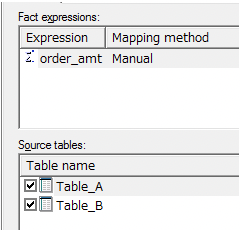
 

ka0PW0000002xOzYAI_0EM4W000006GcNl.jpeg

Example Case 2: The report runs successfully by unchecking [Table_A] from source table.
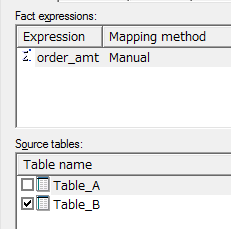
ka0PW0000002xOzYAI_0EM440000002Cio.png

Steps to reproduce

  • Create the objects as follows:
    Attribute: [Level1], [Level2], [Level3], [Item1]
    [Level1], [Level2] and [Level3] attribute has parent-child relationship.
     
ka0PW0000002xOzYAI_0EM440000002Cii.png
  • [Item1] attribute has no relationship.
    Fact: [Revenue]
    Metric: [Revenue] (Sum(Revenue) {~+})
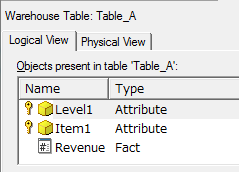
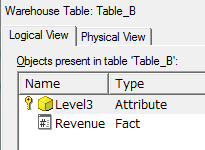
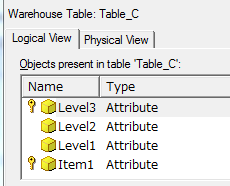
    Those attributes and fact are mapped with [Table_A], [Table_B] and [Table_C] as shown in the image below:
    [Table_A]:
     
ka0PW0000002xOzYAI_0EM440000002Cip.png
  •  
    [Table_B]:
     
ka0PW0000002xOzYAI_0EM440000002Ciq.png
  •  
    [Table_C]:
     
ka0PW0000002xOzYAI_0EM440000002Cij.png
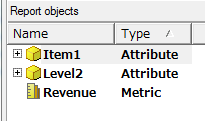
  • Create a report with [Level2], [Item1] and [Revenue] metric and run the report.

ka0PW0000002xOzYAI_0EM440000002Cik.png
  • CASE 1:
    The following error occurs:

    Error: SQLEngine got an Exception from DFC: [DFCENGINE] Engine Logic: Fact does not exist at a level that can support the requested analysis. Fact: "Revenue". Level: "Item1, Level2".

    Error in Process method of Component: SQLEngineServer, Project Proj, Job 835, Error Code= -2147212800.


     This is because either [Table_A] or [Table_B] cannot satisfy the level of [Item1], [Level2].
    CASE 2:
    On the other hand, the following SQL is generated by unchecking [Table_A] from source table in [Revenue] fact.
    
    select a12.Lev2  Lev2,
    
                a12.Item1  Item1,
    
                sum(a11.order_amt)  WJXBFS1
    
    from Table_B a11
    
               join Table_C a12
    
               on  (a11.Lev3 = a12.Lev3)
    
    group by a12.Lev2, a12.Item1

    This is because the fact entry level of the fact in question has been changed by unchecking [Table_A] from source table in [Revenue] fact.

    The SQL Engine tries to find a table which satisfies the combined report calculation level. With [Table_A] removed the fact no longer relates to [Item1] at all. As it no longer relates to the hierarachy containing [Item1] it can just cross join to that attribute in the logic.
    *The report calculation level is decided by combination of the template/report objects attribute levels, metric dimensionality and report/metric filter levels. It ultimately decides what level of data Engine needs to look at in order to fulfill the reporting requirement.
    *fact entry level is the set of all higher level and equal level attributes present in the summation of all the facts source tables.
     
    For Case1, the report calculation level is decided by just the template attribute level, so it is the same as report level, which is [Item1], [level2]
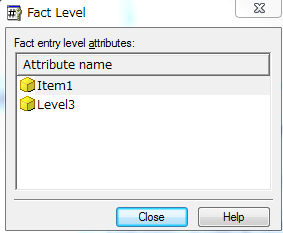
    The fact entry level is [Item1], [Level3] as shown in the image below, so Entry total level is [Item1], [level2]
    Now both attributes in the report calculation level relate to attributes in the fact entry level so are kept.
    This means a fact table is needed which supports [Item1] and [level2] but no such table exists.
     
ka0PW0000002xOzYAI_0EM440000002Cis.png
  •  
    For Case2, the report calculation level is [Item1], [level2]
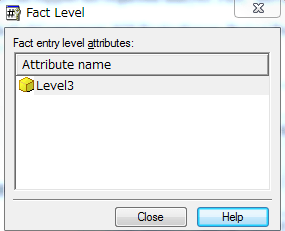
    The fact entry level is [Level3] as shown in the image below, so when joining the two levels as [Item1] and anything related to it is only present in one of the two levels it is discarded.
    This leads to an end fact table level requirement of just [level2].
     
ka0PW0000002xOzYAI_0EM440000002Cit.png
  •  
    SQL engine will find whether there is a table which satisfies the end fact table level requirement to do the report calculation.
    As a result here, the SQL engine finds [Table_B] can satisfy, as this includes [level3] which is a child of [level2].
     

Cause

This issue happens due to a warehouse design problem.

Action

It is recommended to build the lower level table and then do the aggregation to higher level which is more reasonable for warehouse design.

Workaround

If the warehouse design may not be changed for certain reasons, the following two workarounds can be applied:
 
Option 1:
Define a Many to Many relationship between [Item1] and [level3].
The following sql is generated:


select a12.Lev2  Lev2,

 a11.Item1  Item1,

 sum(a11.order_amt)  WJXBFS1

from Table_A a11

 join Table_C a12

   on  (a11.Item1 = a12.Item1 and

 a11.Lev1 = a12.Lev1)

where (exists (select *

 from Table_C c21

 where c21.Lev2 = a12.Lev2

  and  c21.Item1 = a11.Item1))

group by a12.Lev2,

 a11.Item1

Option 2:
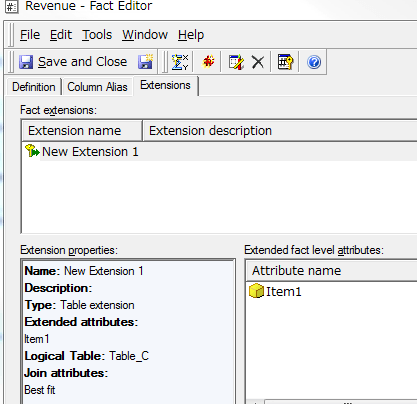
Use fact extension if only this one fact (in example [Revenue]) needs to be calculated, as shown in the image below:
 

ka0PW0000002xOzYAI_0EM440000002Cir.png

 
The following sql is generated:
Sql


select a12.Lev2 Lev2,

a12.Item1 Item1,

sum(a11.order_amt) WJXBFS1

from Table_B a11

join Table_C a12

on (a11.Lev3 = a12.Lev3)

group by a12.Lev2, a12.Item1


Comment

0 comments

Details

Knowledge Article

Published:

April 4, 2017

Last Updated:

August 12, 2024