EducationSoftwareStrategy.com
StrategyCommunity

Knowledge Base

Product

Community

Knowledge Base

TopicsBrowse ArticlesDeveloper Zone

Product

Download SoftwareProduct DocumentationSecurity Hub

Education

Tutorial VideosSolution GalleryEducation courses

Community

GuidelinesGrandmastersEvents
x_social-icon_white.svglinkedin_social-icon_white.svg
Strategy logoCommunity

© Strategy Inc. All Rights Reserved.

LegalTerms of UsePrivacy Policy
  1. Home
  2. Topics

KB442452: The images are not available in Data Import and Dossier editor in MicroStrategy 11


Fernando Iwamoto

Senior Cloud Support Engineer III • MicroStrategy


This document shows an issue in the Data Import and Dossier editor where the images are no available.

Starting with the release of Strategy ONE (March 2024), dossiers are also known as dashboards.
DESCRIPTION:
After upgrading to Strategy 11 the images and icons are not available in the Data Import.

ka0PW0000001JWwYAM_0EM44000000Ragn.png

The images and icons are also not available in the Dossier editor

ka0PW0000001JWwYAM_0EM44000000ghvI.png

  
CAUSE:
Strategy 11 uses the image files in the SVG format and older versions of IIS may incorrectly serve SVG images, causing those issues.
In the case of SVG files, the type should be "image/svg+xml". Unfortunately, some versions of IIS, do not recognize ".svg" extension and therefore return a generic content type, which makes browsers fail to recognize them as images, hence the broken image issue.
ACTION:
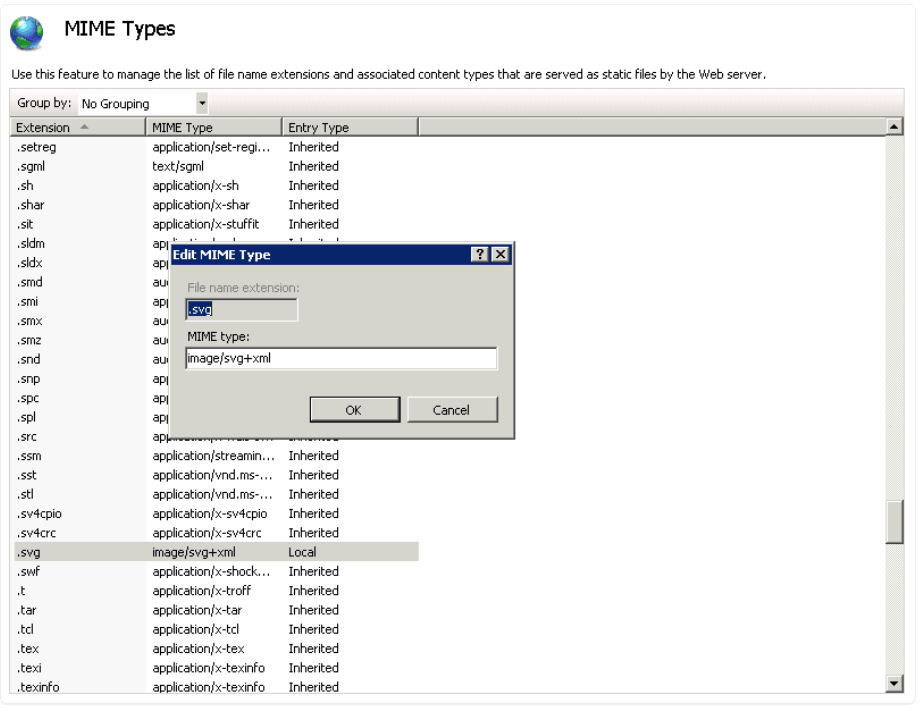
Add ".svg" file extension to supported mime types in IIS config, by setting it's content type to "image/svg+xml".
Below screenshots will show you how:

ka0PW0000001JWwYAM_0EM44000000Rags.png
ka0PW0000001JWwYAM_0EM44000000Ragx.png

KB442452


Comment

0 comments

Details

Knowledge Article

Published:

March 28, 2019

Last Updated:

March 21, 2024