EducationSoftwareStrategy.com
StrategyCommunity

Knowledge Base

Product

Community

Knowledge Base

TopicsBrowse ArticlesDeveloper Zone

Product

Download SoftwareProduct DocumentationSecurity Hub

Education

Tutorial VideosSolution GalleryEducation courses

Community

GuidelinesGrandmastersEvents
x_social-icon_white.svglinkedin_social-icon_white.svg
Strategy logoCommunity

© Strategy Inc. All Rights Reserved.

LegalTerms of UsePrivacy Policy
  1. Home
  2. Topics

KB442453: Dossier loses the font format when exported to PDF file in MicroStrategy 10.11 on Unix/Linux


Fernando Iwamoto

Senior Cloud Support Engineer III • MicroStrategy


This document shows an issue in MicroStrategy 10.11 on Linux when exporting a Dossier to PDF file where the font loses the format. This issue does not happen for Documents

Starting with the release of Strategy ONE (March 2024), dossiers are also known as dashboards.
DESCRIPTION:
In Strategy 10.11 on Linux when exporting a Dossier to PDF file, the font is converted to Times New Roman format.
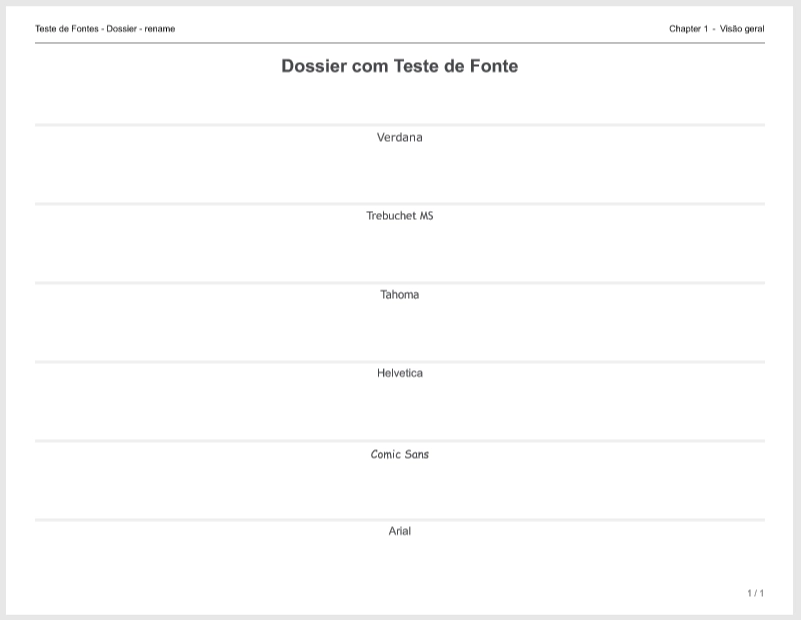
ka0PW0000001JeCYAU_0EM44000000RahH.png

This issue does not happen when exporting from a Document to a PDF file
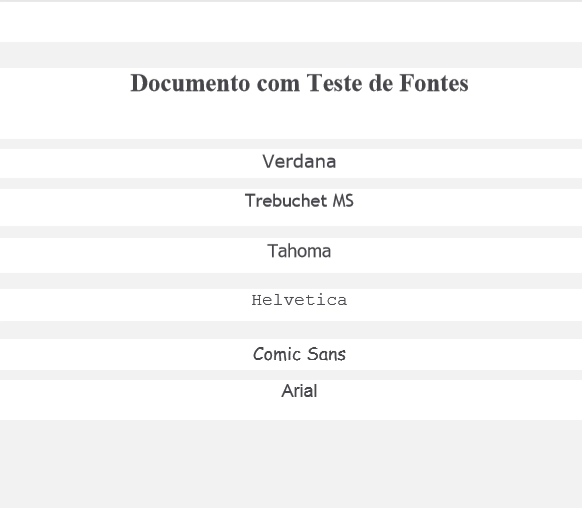
ka0PW0000001JeCYAU_0EM44000000RahR.png

STEPS TO REPRODUCE:
Create a dossier using Verdana, Trebuchet MS, Tahoma, Helvetica, Comic Sans or Arial font and then export a dossier to PDF
CAUSE:
The issue is caused because the New Export Engine doesn't read from the PDFGeneratorFiles folder but from the OS font folder.
 
ACTION:
Copy the Font files to the Font OS Folder.

  1. The location where fontconfig wants the font files to live is configurable, but the default is for each family of fonts to have their own subfolder in /usr/share/fonts/. Copy the font files.
  2. The fontconfig cache needs to be updated by running command: fc-cache /usr/share/fonts/
  3. Verify if the font is installed successfully using: fc-list | sort
  4. If the font is still not showing, restart the process for the new export engine.

KB442453


Comment

0 comments

Details

Knowledge Article

Published:

March 28, 2019

Last Updated:

March 21, 2024