EducationSoftwareStrategy.com
StrategyCommunity

Knowledge Base

Product

Community

Knowledge Base

TopicsBrowse ArticlesDeveloper Zone

Product

Download SoftwareProduct DocumentationSecurity Hub

Education

Tutorial VideosSolution GalleryEducation courses

Community

GuidelinesGrandmastersEvents
x_social-icon_white.svglinkedin_social-icon_white.svg
Strategy logoCommunity

© Strategy Inc. All Rights Reserved.

LegalTerms of UsePrivacy Policy
  1. Home
  2. Topics

KB442490: "Cannot open database '(unknown)'. It may not be a database that your application recognizes, or the file may be corrupt." when connecting to Access Database with ACCDB


Community Admin

• Strategy


"Error type: Odbc error. Odbc operation attempted: SQLDriverConnect. [HY000:-1028: on SQLHANDLE] [Microsoft][ODBC Microsoft Access Driver] Cannot open database '(unknown)'. It may not be a database that your application recognizes, or the file may be corrupt." appears when connecting to Access Database using an .ACCDB file.

SYMPTOM:


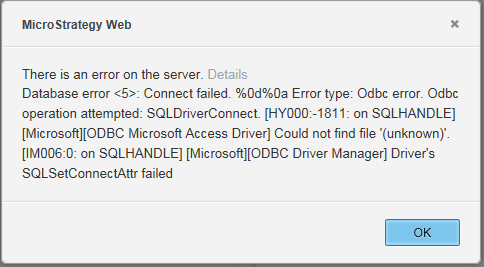
Creating a DSN-less connection in web to an Access Database using an .ACCDB file causes the following error message:
ka04W000000ObB1QAK_0EM44000000Rbzb.png


Error type: Odbc error. Odbc operation attempted: SQLDriverConnect. [HY000:-1028: on SQLHANDLE] [Microsoft][ODBC Microsoft Access Driver] Cannot open database '(unknown)'. It may not be a database that your application recognizes, or the file may be corrupt. [IM006:0: on SQLHANDLE] [Microsoft][ODBC Driver Manager] Driver's SQLSetConnectAttr failed Connection String


CAUSE


Microsoft Access is not a certified ODBC datasource for Strategy. However, mdb files were previously certified (they are currently only used for demo purposes such as the Strategy Tutorial project). 

SOLUTION


If you would like to connect to Strategy Web using a .mdb file via ODBC, please see the instructions below:
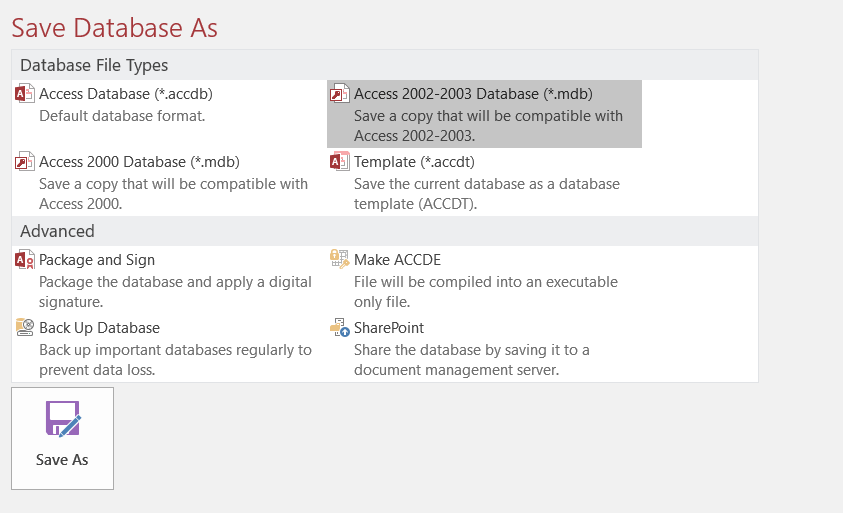
  • Open the file in Microsoft Access > Select Save As > Save the file in 2002-2003 .mdb format.
ka04W000000ObB1QAK_0EM44000000Rbys.png
  • Use the 32 bit Access driver to create a connection between your Access database and Strategy. This file is located in C:\Windows\SysWOW64
  • The Access file must be saved on the Intelligence Server machine or in a shared Network location that the Intelligence Server can see. The file path listed in in the DSN-less Source is the Access file Intelligence Server location. The username and password must be provided for a successful connection.


Alternatively, you can also connect to an Access file as the 'file' data import connector.


Comment

0 comments

Details

Knowledge Article

Published:

December 28, 2018

Last Updated:

December 31, 2018