EducationSoftwareStrategy.com
StrategyCommunity

Knowledge Base

Product

Community

Knowledge Base

TopicsBrowse ArticlesDeveloper Zone

Product

Download SoftwareProduct DocumentationSecurity Hub

Education

Tutorial VideosSolution GalleryEducation courses

Community

GuidelinesGrandmastersEvents
x_social-icon_white.svglinkedin_social-icon_white.svg
Strategy logoCommunity

© Strategy Inc. All Rights Reserved.

LegalTerms of UsePrivacy Policy
  1. Home
  2. Topics

KB44260: The error message "The source manipulator found a missing dependency" appears when importing a package into a project in MicroStrategy Object Manager


Community Admin

• Strategy


This knowledge base article explains why the error message "The source manipulator found a missing dependency" appears when importing a package into a project in MicroStrategy Object Manager 9.4.x-10.x.

SYMPTOM:
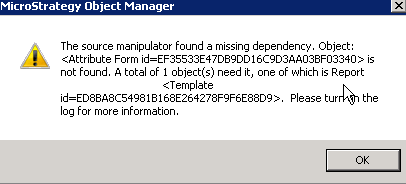
When importing a package into a project in Strategy Object Manager 9.4.x-10.x, the following error message appears:
ka04W000000OfCbQAK_0EM440000002Cim.png


The source manipulator found a missing dependency. Object:<Attribute Form id=XXX> is not found. A total of 1 object(s) need it, one of which is <Template Name> <Template id=XXX>. Please turn on the log for more information.

  
CAUSE:
 
This is because the attribute form category object reported in the error message is not present in the destination project.
 
ACTION:
 
Follow the steps below to work around the issue:

  1. Follow KB19828 to enable the hidden system objects folder
  2. Drag and drop the missing form category object under the hidden System Objects\Form Categories folder from the source to the destination project using Object Manager.


Comment

0 comments

Details

Knowledge Article

Published:

May 11, 2017

Last Updated:

May 11, 2017