In Strategy 10.4.6/10.11 and up, Strategy enhanced the message displayed in Web and the DSSErrors log when the project-level governing setting “Maximum Inbox message size (MB)” is exceeded.
About “Maximum Inbox message size (MB)”
The setting locates in Project Configuration-Project definition-History List.
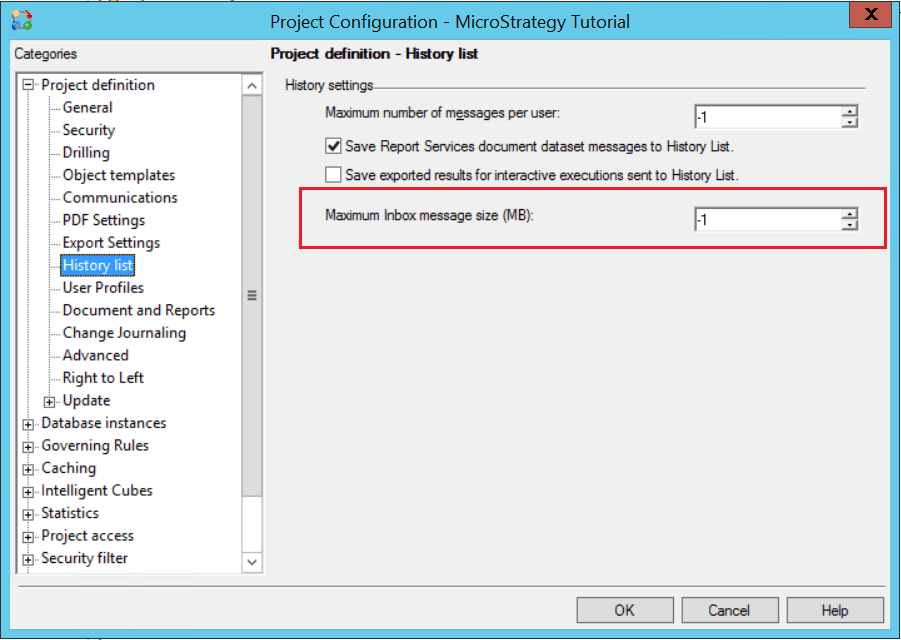
This setting is designed to restrict users from sending large documents and dashboards to the History List ensuring that the storage is optimally used.
Max value allowed:
The max valued allowed is 4096(namely 4GB).
If the value is set to -1(which means no limit) or a value larger than 4096, e.g. 8192, it will still be limited as 4GB.
What would happen if the limit is exceeded:
Assume “Maximum Inbox message size (MB)” has been set to 1024(1GB).
1. Message size < 1GB
The result will be added to History List successfully.
DSSErrors contains no error.
2. 1GB<Message size<4GB
Below message will be displayed in Web:
An error has occurred on this page.
User request is queued.
(Cannot save History list message because message size (xxxMB) exceeds the allowable limit of 1024 MB.)
[Kernel][Error][0x80009FC6] Cannot save History list message because message size (xxxMB) exceeds the allowable limit of 1024 MB.
[Kernel][Error] CDSSServerMessage::SaveDocMsgRslt() for msg 74CA617011E7AE4D00000080EF1560CE returns error = 0x80009FC6
An error has occurred on this page.
User request is queued.
(Cannot save History list message because message size (Greater than 4096 MB) exceeds the allowable limit of 4096 MB.)
[Kernel][Error][0x80009FC6] Cannot save History list message because message size (Greater than 4096 MB) exceeds the allowable limit of 4096 MB.
[Kernel][Error] CDSSServerMessage::SaveDocMsgRslt() for msg 0DDB9DA211E7AE4E15210080EF05BF55 returns error = 0x80009FC6
