EducationSoftwareStrategy.com
StrategyCommunity

Knowledge Base

Product

Community

Knowledge Base

TopicsBrowse ArticlesDeveloper Zone

Product

Download SoftwareProduct DocumentationSecurity Hub

Education

Tutorial VideosSolution GalleryEducation courses

Community

GuidelinesGrandmastersEvents
x_social-icon_white.svglinkedin_social-icon_white.svg
Strategy logoCommunity

© Strategy Inc. All Rights Reserved.

LegalTerms of UsePrivacy Policy
  1. Home
  2. Topics

KB442627: Error message “Access denied” appears when users install 10.4 Hotfix on Windows with Administrator account


Lisha Ma

Senior Cloud Support Engineer III • MicroStrategy


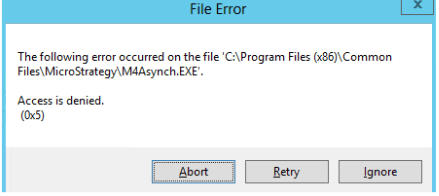
When installing Hotfix 7 or Hotfix 8 on top of 10.4 in windows, even using administrator account, users receive the error message "The following error occurred on the file :"C:\Program Files (x86)\Common Files\MicroStrategy\XXXXXX.EXE" Access denied(0x5)""

Symptom:
When installing Hotfix 7 or Hotfix 8 on top of 10.4 in windows, even using administrator account, users receive the error message as below.


The following error occurred on the file :"C:\Program Files (x86)\Common Files\Strategy\XXXXXX.EXE" Access denied(0x5)"
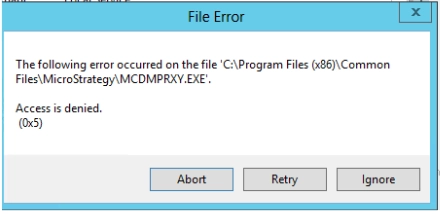
ka044000000kTsRAAU_0EM44000000gEQX.png
ka044000000kTsRAAU_0EM44000000gEQh.png

 
It is actually a warning rather than an error because while click Retry or Ignore, users can continue the installation and complete successfully.
Cause:
This issue is caused by unclean machine.
Action:
To avoid this warning, uninstall the hotfix, repair the 10.4 installation and reinstall hotfix.
It is also strongly recommend to operate complete uninstall every time when users uninstall the product. For how to perform complete uninstallation, refer to the article below.
KB307710: How to uninstall MicroStrategy Analytics Enterprise using the Uninstallation Cleanup Utility
 
KB442627


Comment

0 comments

Details

Knowledge Article

Published:

March 20, 2019

Last Updated:

March 20, 2019