EducationSoftwareStrategy.com
StrategyCommunity

Knowledge Base

Product

Community

Knowledge Base

TopicsBrowse ArticlesDeveloper Zone

Product

Download SoftwareProduct DocumentationSecurity Hub

Education

Tutorial VideosSolution GalleryEducation courses

Community

GuidelinesGrandmastersEvents
x_social-icon_white.svglinkedin_social-icon_white.svg
Strategy logoCommunity

© Strategy Inc. All Rights Reserved.

LegalTerms of UsePrivacy Policy
  1. Home
  2. Topics

KB44276: Unload Project option is grayed out from Administration Menu in MicroStrategy Developer 9.x


Stefan Zepeda

Salesforce Solutions Architect • Strategy


SYMPTOM:
 
While users login to 3-tier project source in Developer 9.x, it is observed that the "Unload" option is grayed out under menu Administration -> Projects even though the user has sufficient privilege.
 

ka02R000000kVlIQAU_0EM440000002Cix.png

 
CAUSE:
 
This is a known issue in Strategy Developer 9.x.
 
ACTION:
 
Contact Strategy Technical Support for updates regarding the issue.
 
WORKAROUND:
 
There are two other ways for users to unload the projects without re-configuring the Intelligence Server via Configuration Wizard.
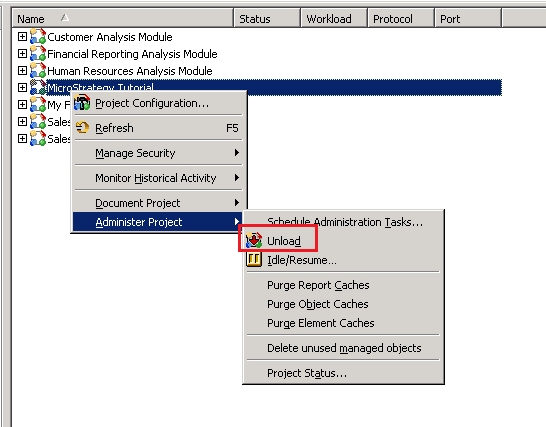
 

  • Under the project source, go to Administration -> System Administration -> Project, right mouse click the project and select Administer Project-> Unload.
     
ka02R000000kVlIQAU_0EM440000002Ciw.png


  • Run following script in Command Manager.


    UNLOAD PROJECT "<project_name>


Comment

0 comments

Details

Knowledge Article

Published:

May 24, 2017

Last Updated:

May 24, 2017