EducationSoftwareStrategy.com
StrategyCommunity

Knowledge Base

Product

Community

Knowledge Base

TopicsBrowse ArticlesDeveloper Zone

Product

Download SoftwareProduct DocumentationSecurity Hub

Education

Tutorial VideosSolution GalleryEducation courses

Community

GuidelinesGrandmastersEvents
x_social-icon_white.svglinkedin_social-icon_white.svg
Strategy logoCommunity

© Strategy Inc. All Rights Reserved.

LegalTerms of UsePrivacy Policy
  1. Home
  2. Topics

KB4428: Why does the Job Monitor not display anything when running a report in MicroStrategy 9.x and later


Stefan Zepeda

Salesforce Solutions Architect • Strategy


When a user runs a report and opens the Job Monitor, the window may be empty. Typically, the reason no reports (jobs) are displayed is that the report has already run before the user arrives at the Job Monitor.
 

ka02R000000kbzQQAQ_0EM440000002GId.gif

 
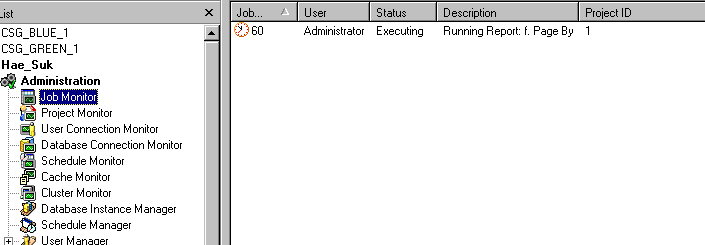
If a large report is run, the job for that report will be displayed until the report is finished running. The Job Monitor only displays a job while it is running; once the job is complete, it is removed from the Job Monitor screen.
 

ka02R000000kbzQQAQ_0EM440000002GIb.gif

 
The Job Monitor does not record a history of run jobs, but displays the current running jobs.


Comment

0 comments

Details

Knowledge Article

Published:

June 2, 2017

Last Updated:

June 2, 2017