EducationSoftwareStrategy.com
StrategyCommunity

Knowledge Base

Product

Community

Knowledge Base

TopicsBrowse ArticlesDeveloper Zone

Product

Download SoftwareProduct DocumentationSecurity Hub

Education

Tutorial VideosSolution GalleryEducation courses

Community

GuidelinesGrandmastersEvents
x_social-icon_white.svglinkedin_social-icon_white.svg
Strategy logoCommunity

© Strategy Inc. All Rights Reserved.

LegalTerms of UsePrivacy Policy
  1. Home
  2. Topics

KB44286: Document caches are not deleted by scheduled maintenance task "Delete caches" in MicroStrategy Developer 9.x and above


Stefan Zepeda

Salesforce Solutions Architect • Strategy


This techniote explains the enhancement request to have the administrative task to delete caches delete the document caches as well.

SYMPTOM:
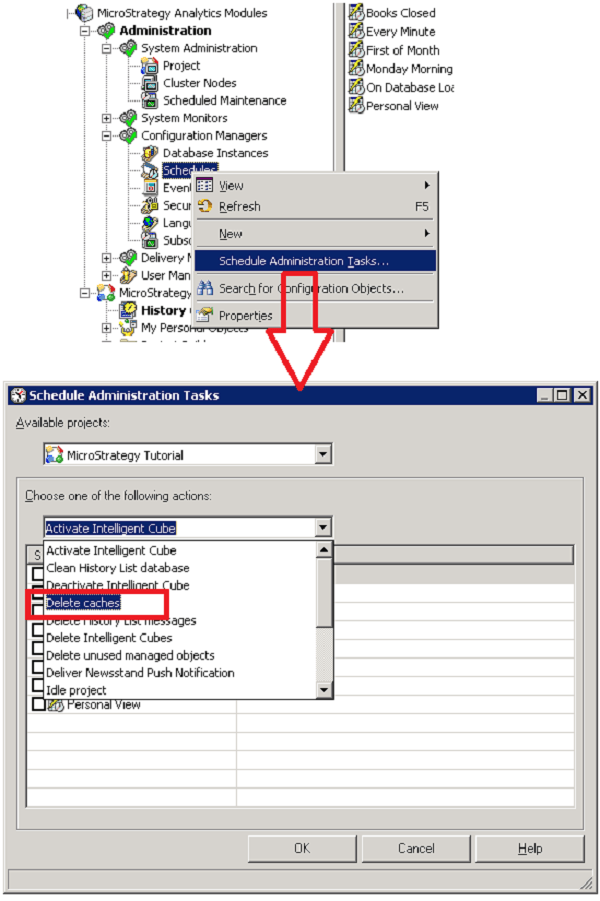
Some document caches can be created without dataset caches, such as documents created against visual insight and so on. This kind of document caches cannot be deleted by scheduled maintenance task "Delete caches" in Strategy Developer 9.x and above.
 
STEPS TO REPRODUCE:
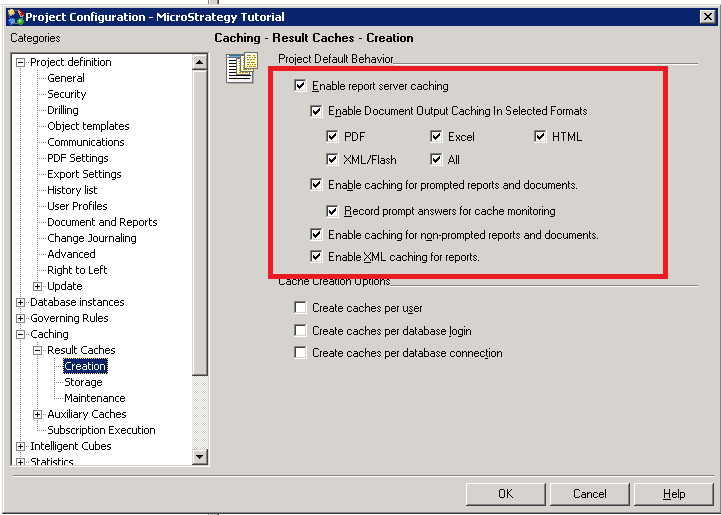
  1. Enable report and document caches in Project configuration -> Caching -> Creation, as shown below.
ka0PW0000002xnBYAQ_0EM4400000029Yl.png
  • Go to Web ->Strategy Tutorial ->Shared reports ->Dashboards and Scorecards and execute document Casino Visual Insight Analysis.
  • Check cache monitor to confirm document caches have been created.
  • Schedule administration tasks to delete caches, as shown below.
ka0PW0000002xnBYAQ_0EM4400000029Yk.png

CAUSE:
This is a known enhancement request for  Strategy Intelligence Server 10.x.
 
ACTION: 
Contact Strategy Technical Support for update.
 
WORKAROUND:
Manually delete document caches in cache monitor. 


Comment

0 comments

Details

Knowledge Article

Published:

June 9, 2017

Last Updated:

August 12, 2024