EducationSoftwareStrategy.com
StrategyCommunity

Knowledge Base

Product

Community

Knowledge Base

TopicsBrowse ArticlesDeveloper Zone

Product

Download SoftwareProduct DocumentationSecurity Hub

Education

Tutorial VideosSolution GalleryEducation courses

Community

GuidelinesGrandmastersEvents
x_social-icon_white.svglinkedin_social-icon_white.svg
Strategy logoCommunity

© Strategy Inc. All Rights Reserved.

LegalTerms of UsePrivacy Policy
  1. Home
  2. Topics

KB44297: “ORA-00932: inconsistent datatypes: expected NUMBER got DATE” error occurs when running a report containing a metric using the DaysBetween function in MicroStrategy with an Oracle database.


Community Admin

• Strategy


This article describes an issue that can happen when using Oracle and the daysbetween function leading to an error.

SYMPTOM:
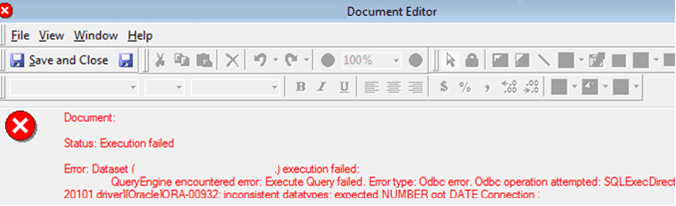
In Strategy, users may find that running a report against an Oracle warehouse results in the error shown below when the report contains an object using the DaysBetween() function:
ka04W000000Oe1xQAC_0EM440000002ChJ.png

 
ORA-00932: inconsistent datatypes: expected NUMBER got DATE
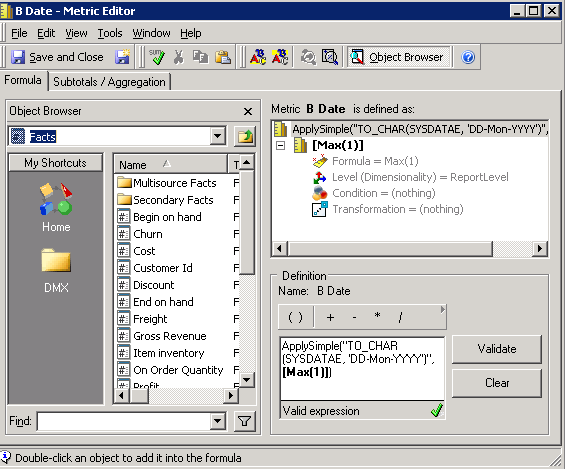
The object used in the report is defined with a DaysBetween function; One or both of the inputs (in the example below Date1 or Date2) metrics, attributes or facts may have a data type that is not compatible with the DaysBetween function. As an example consider either Date1 or Date2 defined as ApplySimple(“TO_CHAR(SYSDATE, ‘DD-Mon-YYYY’)”,) as shown below:
ka04W000000Oe1xQAC_0EM440000002ChA.png

 
An example of the SQL generated for the metric is shown below:


create table ZZMD00 nologging as 
select a11.COLUMN_ID CL_ID, 
max(a11.A_DATE) WJXBFS1 
from TABLEA a11 
where a11.TYPE= 1 
group by a11.CL_ID 

create table ZZMD01 nologging as 
select a11.COLUMN_ID CL_ID TO_CHAR(SYSDATE, 'DD-Mon-YYYY') WJXBFS1 
from TABLE1 a11 
group by a11.CL_ID 

select distinct coalesce(pa11.CL_ID, pa12.CL_ID) CL_ID, 
(TRUNC(pa12.WJXBFS1) - TRUNC(pa11.WJXBFS1)) WJXBFS1
 

CAUSE:
The error is due to an improper data type being present as one of the inputs to the DaysBetween() function. In the example above the datatype used for the Date2 argument to the function is a VARCHAR datatype which is unexpected by the Oracle Database. This issue is seen as the Strategy function requires valid date inputs to work otherwise its SQL syntax is not valid.
ACTION:
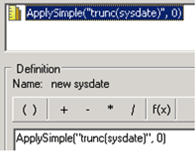
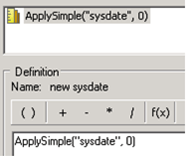
Users should modify the definition of the objects used in the DaysBetween() function so that the data type of the input data is DATE. As an example if the metric is to return the system date, the following solution could be used:

ka04W000000Oe1xQAC_0EM440000002ChH.png

Or

ka04W000000Oe1xQAC_0EM440000002ChL.png

Comment

0 comments

Details

Knowledge Article

Published:

April 4, 2017

Last Updated:

April 4, 2017