EducationSoftwareStrategy.com
StrategyCommunity

Knowledge Base

Product

Community

Knowledge Base

TopicsBrowse ArticlesDeveloper Zone

Product

Download SoftwareProduct DocumentationSecurity Hub

Education

Tutorial VideosSolution GalleryEducation courses

Community

GuidelinesGrandmastersEvents
x_social-icon_white.svglinkedin_social-icon_white.svg
Strategy logoCommunity

© Strategy Inc. All Rights Reserved.

LegalTerms of UsePrivacy Policy
  1. Home
  2. Topics

KB44302: After a dashboard exported to PDF, widgets are replaced by graphs or grids in MicroStrategy Web


Community Admin

• Strategy


After a dashboard exported to PDF, widgets are replaced by graphs or grids in MicroStrategy Web.

SYMPTOM:
 
When viewing a widget in Flash mode, it displays normally.
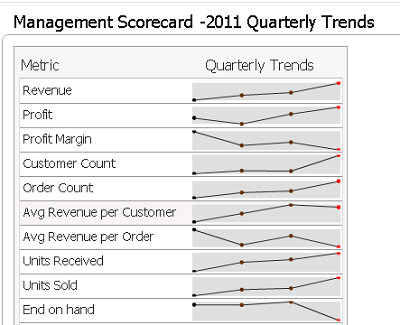
ka04W00000148FrQAI_0EM4400000029Yy.png

 
Then export it to PDF.

ka04W00000148FrQAI_0EM4400000029Yb.png

 
The widget is replaced by graphs or grids.
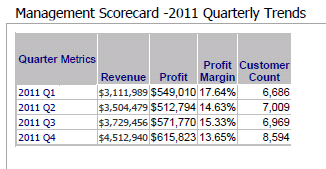
ka04W00000148FrQAI_0EM4400000029Z3.png


CAUSE:
 
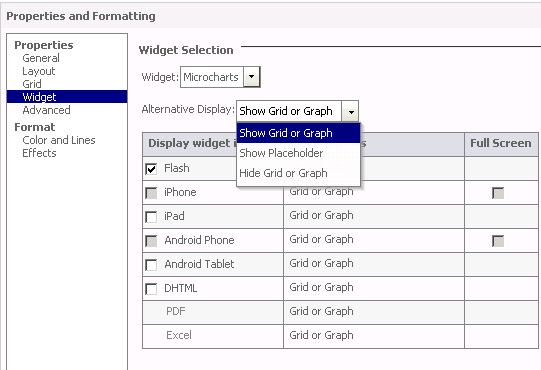
It is only supported to export widgets as Grid/Graph, Placeholder or Hidden to PDF.
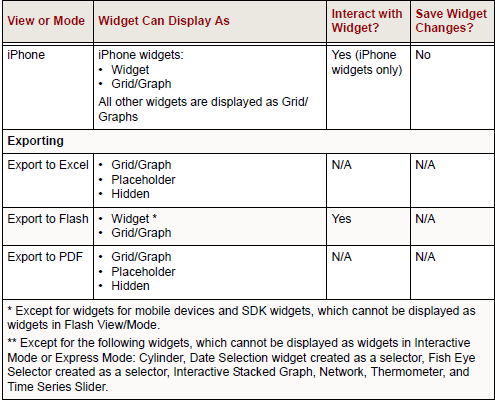
 

ka04W00000148FrQAI_0EM4400000029Z1.png

 
Options to export widgets as Grid or Graph, Placeholder or Hidden can be chosen in Properties and Formatting of a widget.
ka04W00000148FrQAI_0EM4400000029Yz.png

 
For detailed information, refer to Strategy 9.4.1 Product Manual Dashboards and Widgets Creation Guide P.258
 
WORKAROUND:
 

  1. Choose PDF format to export to Flash at project configuration. 
  2. Restart the Web Application Server. 
  3. Export the Dashboard to Flash. Notice that the flash export will show in an interactive PDF file.


Comment

0 comments

Details

Knowledge Article

Published:

April 21, 2017

Last Updated:

April 21, 2017