Below are the syntax and examples (from Strategy Tutorial Project) necissary to answer Date value, Attribute qualification, Attribute element list, Text value, and Object prompts when using the 'CREATE HISTORYLISTSUBSCRIPTION' command in Strategy Command Manager 9.x and 10.x
1. Answering Date value prompts

CREATE HISTORYLISTSUBSCRIPTION "PromptedSubscription1' FOR OWNER "Administrator" SCHEDULE "Books Closed" USER "Administrator" CONTENT "prompt" IN FOLDER "Public Objects\Reports" IN PROJECT "Strategy Tutorial" PROMPT "value(Date)" ANSWER "10/12/2012";
2. Answering Attribute Qualification prompts

CREATE HISTORYLISTSUBSCRIPTION "PromptedSubscription2' FOR OWNER "Administrator" SCHEDULE "Books Closed" USER "Administrator" CONTENT "prompt2" IN FOLDER "Public Objects\Reports" IN PROJECT "Strategy Tutorial" PROMPT "Qualification on Year" ANSWER "Year@ID=2010";
*Note: Text values cannot be used here, ONLY numeric values.
3. Answering Attribute Element list prompts

CREATE HISTORYLISTSUBSCRIPTION "PromptedSubscription3' FOR OWNER "Administrator" SCHEDULE "Books Closed" USER "Administrator" CONTENT "prompt3" IN FOLDER "Public Objects\Reports" IN PROJECT "Strategy Tutorial" PROMPT "Elements of Region" ANSWER "8D679D4B11D3E4981000E787EC6DE8A4:1";
*Note: 1 is the ID of the attribute region that was selected
4. Answering Text Value Prompts

CREATE HISTORYLISTSUBSCRIPTION "PromptedSubscription4' FOR OWNER "Administrator" SCHEDULE "Books Closed" USER "Administrator" CONTENT "prompt4" IN FOLDER "Public Objects\Reports" IN PROJECT "Strategy Tutorial" PROMPT "Value(Text)" ANSWER "Region@DESC=South";
5. Answering Object Prompts
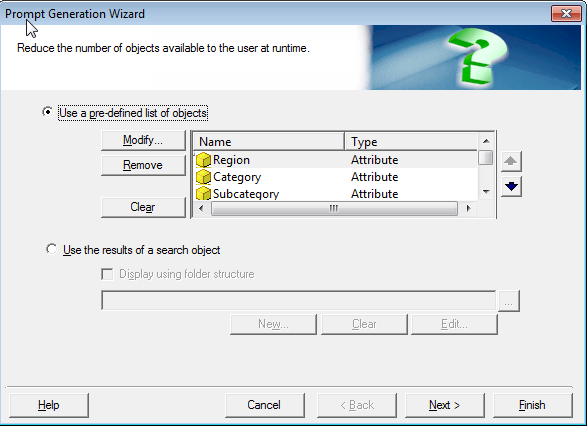
Here are the Attributes used in the Object Prompt example above:

CREATE HISTORYLISTSUBSCRIPTION "PromptedSubscription5' FOR OWNER "Administrator" SCHEDULE "Books Closed" USER "Administrator" CONTENT "Product Analysis Report Builder" IN FOLDER "Public Objects\Reports\Strategy Platform Capabilities\Ad Hoc Reporting\Prompts" IN PROJECT "Strategy Tutorial" PROMPT "Select attributes Time-Product-Geography" ANSWER "8D679D4B11D3E4981000E787EC6DE8A4, 8E789D4B11D3E4981000E787EC6DE8A4:, PROMPT "Sales Metrics" ANSWER "7D679D4B11D3E4981000E676EC6DE8A4, 8D679F4B11D3E4981111E787EC6DE8A4";
*Note: The above prompt answers are the attribute and metric ID's used in the Object Prompt
