EducationSoftwareStrategy.com
StrategyCommunity

Knowledge Base

Product

Community

Knowledge Base

TopicsBrowse ArticlesDeveloper Zone

Product

Download SoftwareProduct DocumentationSecurity Hub

Education

Tutorial VideosSolution GalleryEducation courses

Community

GuidelinesGrandmastersEvents
x_social-icon_white.svglinkedin_social-icon_white.svg
Strategy logoCommunity

© Strategy Inc. All Rights Reserved.

LegalTerms of UsePrivacy Policy
  1. Home
  2. Topics

KB44329: Translation for subtotal labels do not take effect for existing reports after adding a new language to a project in MicroStrategy 9.4.1, 10.x, and 2019


Stefan Zepeda

Salesforce Solutions Architect • Strategy


Translation for subtotal labels do not take effect for existing reports after adding a new language to a project in MicroStrategy 9.4.1, 10.x, and 2019

SYMPTOM
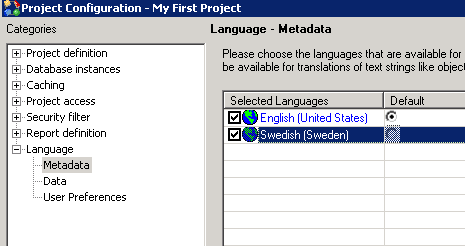
Consider that a new language is added to a project by going to Project Configuration > Language > Metadata from Strategy Developer 9.4.1, 10.x, and 2019 as shown:
 

ka02R000000kdzcQAA_0EM440000002Cie.png

 
Additionally, the system objects' translations are updated for the new language by going to Project Configuration > Project definition > Update > Translations and clicking the 'Update' button as shown:

ka02R000000kdzcQAA_0EM440000002Cic.png

 
Users who are setup for the new language might observe that for newly created reports thereafter, any added out of the box subtotal labels (such as the Grand Total) get translated correctly as shown:

ka02R000000kdzcQAA_0EM440000002Cig.png

 
However, for reports which were created prior to adding the language, the total labels do not get translated as expected:

ka02R000000kdzcQAA_0EM440000002Cia.png

 
CAUSE
This is a known issue for existing reports after adding a new language in Strategy 9.4.1, 10.x, and 2019
 
ACTION
Contact Strategy Technical Support for an update on the status of this issue.


Comment

0 comments

Details

Knowledge Article

Published:

May 31, 2017

Last Updated:

June 10, 2019