EducationSoftwareStrategy.com
StrategyCommunity

Knowledge Base

Product

Community

Knowledge Base

TopicsBrowse ArticlesDeveloper Zone

Product

Download SoftwareProduct DocumentationSecurity Hub

Education

Tutorial VideosSolution GalleryEducation courses

Community

GuidelinesGrandmastersEvents
x_social-icon_white.svglinkedin_social-icon_white.svg
Strategy logoCommunity

© Strategy Inc. All Rights Reserved.

LegalTerms of UsePrivacy Policy
  1. Home
  2. Topics

KB44344: "Object (of type: Prompt) not allowed in this place" informative message is shown when manually adding a Value Prompt in the Derived Metric formula definition


Stefan Zepeda

Salesforce Solutions Architect • Strategy


SYMPTOM:
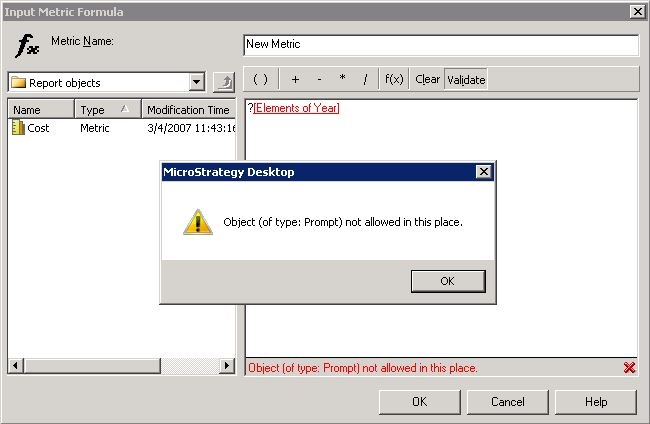
When manually adding a Value Prompt in the Derived Metric formula definition with the following notation ? then clicking on the Validate button, the following informative message is seen:
ka02R000000kVjpQAE_0EM440000002Chg.jpeg

 
Object (of type: Prompt) not allowed in this place.
 
 
CAUSE
This is working as designed; currently, it is not supported the usage of Prompt objects in the derived metric formula definition.
 
 
ALTERNATE SOLUTION
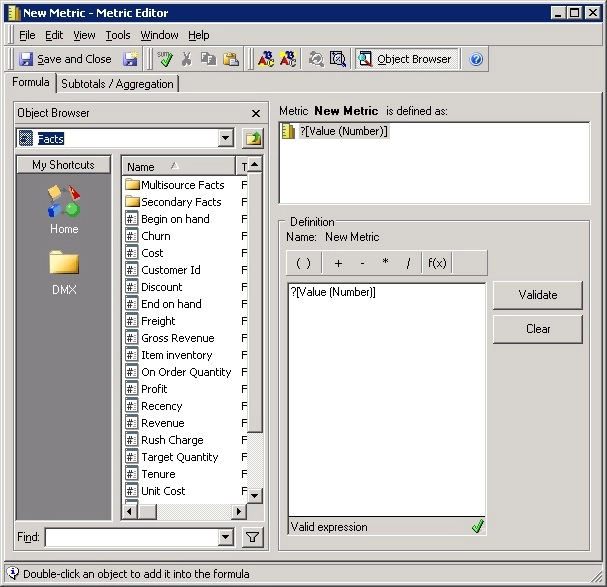
1) As a workaround create a regular metric containing only a Value Prompt as its definition; for instance:
ka02R000000kVjpQAE_0EM440000002Chj.jpeg

 
2) Add the newly created metric in the report definition. 
3) Thus, this metric will be available to be selected in the derived metric formula definition.


Comment

0 comments

Details

Knowledge Article

Published:

May 25, 2017

Last Updated:

May 25, 2017