EducationSoftwareStrategy.com
StrategyCommunity

Knowledge Base

Product

Community

Knowledge Base

TopicsBrowse ArticlesDeveloper Zone

Product

Download SoftwareProduct DocumentationSecurity Hub

Education

Tutorial VideosSolution GalleryEducation courses

Community

GuidelinesGrandmastersEvents
x_social-icon_white.svglinkedin_social-icon_white.svg
Strategy logoCommunity

© Strategy Inc. All Rights Reserved.

LegalTerms of UsePrivacy Policy
  1. Home
  2. Topics

KB44360: The Share menu context menu item is not available if the Session information is not included in the URL in MicroStrategy Web 9.x


Community Admin

• Strategy


The Share menu context menu item is not available if the Session information is not included in the URL in MicroStrategy Web 9.x

SYMPTOM:
The Share menu is not available when right-clicking a report or document in Strategy Web 9.x as shown below :
 

ka04W000000OgcvQAC_0EM4400000026aG.png

 
The following is how it usually shows.
  

ka04W000000OgcvQAC_0EM4400000026aH.png

 
CAUSE:
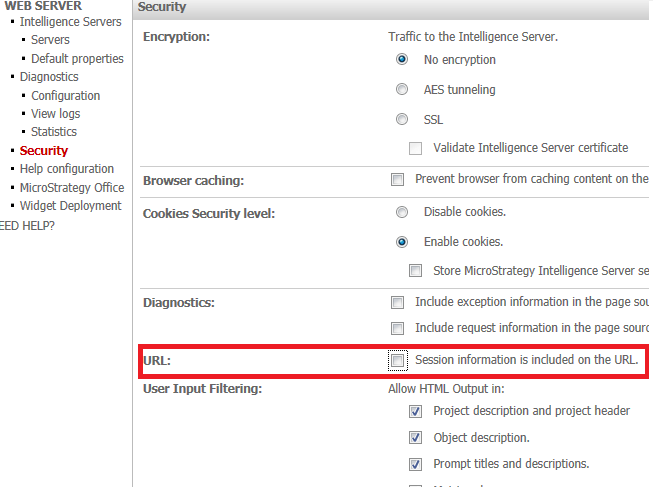
This is working as designed in Strategy Web 9.x. When the option "Session information is included on the URL " is disabled under the Web Administrator > Security > URL, parameters such as the IServer name, Project name, and Port number are removed from the URLs generated by this link. Under this scenario, the URLs would always fail since they have no information on how to fill the missing parameters in, thus the decision was made to hide the context menu item.


ka04W000000OgcvQAC_0EM4400000026aE.png

ACTION:
An enhancement request has been logged to add this feature into Strategy Web.
Contact Strategy Technical Support for an update on this issue.
 
WORKAROUND:
To continue seeing the Show Link menu item, enable the "Session information is included on the URL" setting.


Comment

0 comments

Details

Knowledge Article

Published:

June 13, 2017

Last Updated:

June 13, 2017