SYMPTOM:
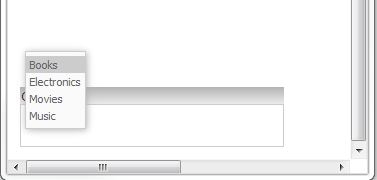
In Strategy Web 9.3.1, when a search box selector is placed towards the bottom of the document that it would be close to the bottom edge of the browser window, the search results will display upward instead of downward overlapping the text input box in a report services document run in Express Mode. This prevents users from seeing what they are typing, like shown below.
STEPS TO REPRODUCE:
Follow these instructions using Strategy Tutorial to reproduce the issue.
CAUSE:
This is a known limitation of Strategy Web 9.3.1 Express mode. The results of the Search Box selector are required to display inside the browser window thus it displays upward. An enhancement request has been logged to address this display problem.
ACTION:
Contact Strategy Technical Support for an update on this issue.
WORKAROUND:
