EducationSoftwareStrategy.com
StrategyCommunity

Knowledge Base

Product

Community

Knowledge Base

TopicsBrowse ArticlesDeveloper Zone

Product

Download SoftwareProduct DocumentationSecurity Hub

Education

Tutorial VideosSolution GalleryEducation courses

Community

GuidelinesGrandmastersEvents
x_social-icon_white.svglinkedin_social-icon_white.svg
Strategy logoCommunity

© Strategy Inc. All Rights Reserved.

LegalTerms of UsePrivacy Policy
  1. Home
  2. Topics

KB44387: In a nested prompt, the first prompted filter is not applied when no answer is selected for the second prompt in MicroStrategy Developer 9.4.1 and 10.x.


Stefan Zepeda

Salesforce Solutions Architect • Strategy


When a user has a nested prompt and does not provide an answer to the second prompt, the first prompt answer is not applied to the report.

SYMPTOM:
When a user has a nested prompt and does not provide an answer to the second prompt, the first prompt answer is not applied to the report.
 
STEPS TO REPRODUCE:

  • Within the Tutorial project, create a prompted filter on "Year", and add that filter to an attribute element prompt on "Month".
  • Add the prompt into a new report. 
  • Run the report, select "2009" for the "Year", but do not select any months. See that the filter for '2009" is not applied:
ka02R000000kZz5QAE_0EM440000002Chx.png

 
CAUSE:
This is due to the fact that the filter on "Year" is only applied to the prompt itself, and not to the report.
 
ACTION:
Add the filter on "Year" (the same one used in the nested prompt) into the report itself.
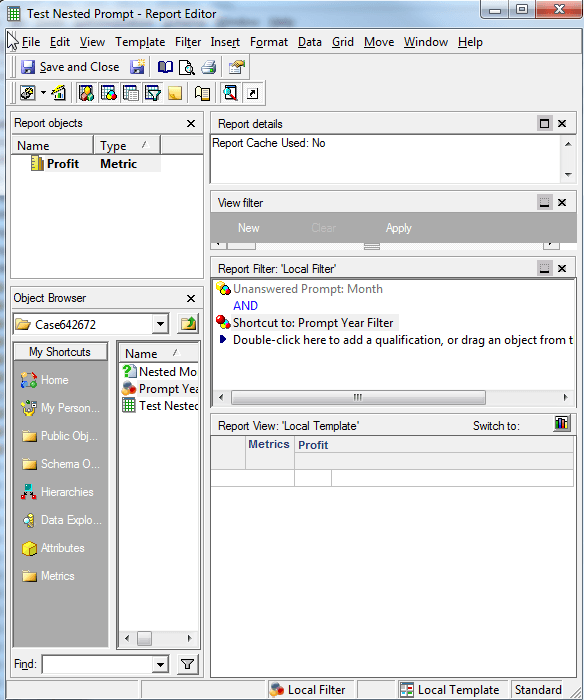
ka02R000000kZz5QAE_0EM440000002ChX.png

 
See that "2009" is now applied to the report:

ka02R000000kZz5QAE_0EM440000002Chq.png


Comment

0 comments

Details

Knowledge Article

Published:

June 1, 2017

Last Updated:

June 1, 2017