EducationSoftwareStrategy.com
StrategyCommunity

Knowledge Base

Product

Community

Knowledge Base

TopicsBrowse ArticlesDeveloper Zone

Product

Download SoftwareProduct DocumentationSecurity Hub

Education

Tutorial VideosSolution GalleryEducation courses

Community

GuidelinesGrandmastersEvents
x_social-icon_white.svglinkedin_social-icon_white.svg
Strategy logoCommunity

© Strategy Inc. All Rights Reserved.

LegalTerms of UsePrivacy Policy
  1. Home
  2. Topics

KB44397: "Connection Dead. This may have occurred because the server requires Oracle Advanced Security" error received when connecting to an Oracle 11g R2 instance after enabling the Oracle Advanced Security in MicroStrategy 9.3.1 running on Red Hat 6.x


Community Admin

• Strategy


After enabling the Oracle Advanced Security in the MicroStrategy ODBC Driver for Oracle Wire Protocol version 7.10.00.30 to achieve an encrypted communication based on the RC4 algorithm against an Oracle 11g R2 instance in MicroStrategy 9.3.1 running on Red Hat 6.x, an error message appears "Connection Dead. This may have occurred... ".

SYMPTOM:
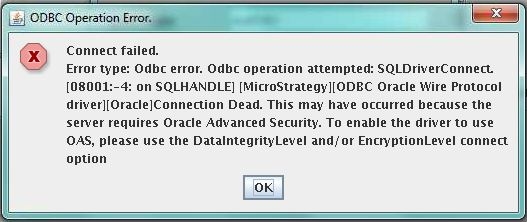
After enabling the Oracle Advanced Security in the Strategy ODBC Driver for Oracle Wire Protocol version 7.10.00.30 to achieve an encrypted communication based on the RC4 algorithm against an Oracle 11g R2 instance in Strategy 9.3.1 running on Red Hat 6.x, the following error message appears:
ka04W000000OfIeQAK_0EM440000002JDS.jpeg

Error Message


Connect failed.  Error type: Odbc error. Odbc operation attempted: SQLDriverConnect. Connection Dead. This may have occurred because the server requires Oracle Advanced Security. To enable the driver to use OAS, please use the DataIntegrityLevel and/or EncryptionLevel connect option

CAUSE:
This error occurs due to the Strategy ODBC Driver for Oracle Wire Protocol hasn't been configured properly.
ACTION:
In order to establish an encrypted communication to an Oracle 11g R2 instance, using the RC4 algorithm, configure the Strategy ODBC Driver for Oracle Wire Protocol, appending the following parameters into the ODBC.INI file along with the required Oracle connection settings:

•EncryptionLevel = 3
•EncryptionTypes = RC4_256
•DataIntegrityLevel = 3
•DataIntegrityTypes = MD5
•EncryptionMethod=0


Comment

0 comments

Details

Knowledge Article

Published:

May 3, 2017

Last Updated:

May 3, 2017