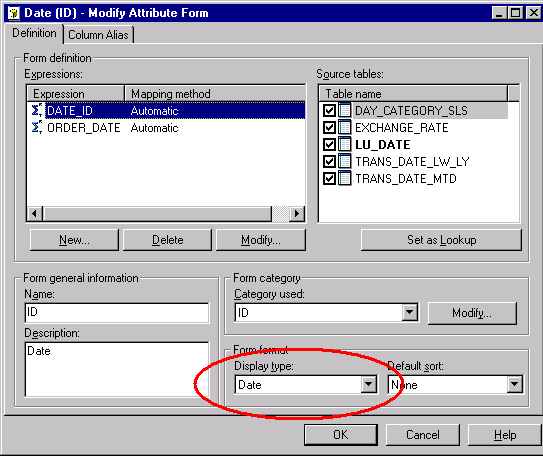
What is the method for including a calendar in the Attribute Qualification window when creating a filter for a numeric datatype?
Suppose a user wants to create the filter 'Yesterday'. In this case, every time a report containing this filter is executed, the returned data will be from the previous day. Additionally, suppose that all dates in the lookup tables are datatype 'Numeric' instead of datatype 'Date'. As a result, the user will not be able to specify 'Today - 1' (current date minus one day) when creating an attribute qualification to construct this filter ('Yesterday') because no calendar appears in the Attribute Qualification window.
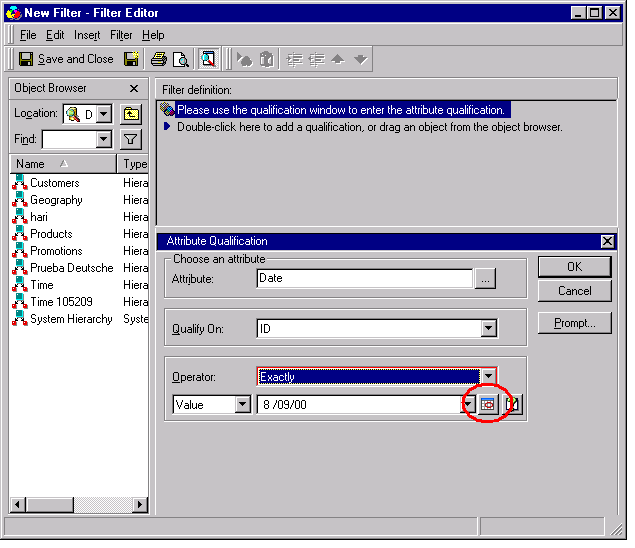
To include a calendar in the Attribute Qualification window, follow the steps below:
NOTE: The datatype on the backend should be some sort of Date datatype. Any other datatype will not return the expected result set.