SUMMARY
This issue has been classified as an Enhancement Request by Strategy. The impact is limited to Strategy Command Manager 9.x product only when trying to create undo packages from client machines. A solution for this is available in current releases of Strategy 10.x
SYMPTOM
On Strategy 9.x Command Manager, when trying to create Undopackages from any client machine based on an existing project/configuration package a not very meaningful error message is shown, although the script syntax is correct and the package file is valid:
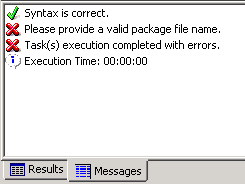
Sample Code/Error
Please provide a valid package file name.
Task(s) execution completed with errors.
STEPS TO REPRODUCE
1. From the Strategy Object Manager on a client machine connect to the Intelligence Server and create a project package.
2. Now from the same client machine, connect to the same Intelligence Server via Strategy Command Manager.
3. Insert a package outline to create an Undo package using following syntax as example:

Sample Code/Error
CREATE UNDOPACKAGE "C:\Program Files (x86)\Common Files\MicroStrategy\UNDO_ProjectPackage.mmp" FOR PROJECT "Strategy Tutorial" FROM PACKAGE "C:\Program Files (x86)\Common Files\MicroStrategy\ProjectPackage.mmp";
4. Check the syntax and execute the script to see the error message.
CAUSE
This is working by design for Strategy 9.x. The Create_Undo_Package_Outline outline cannot access the package file in the client location. The package has to be located in the Intelligence Server machine as this is the current search behavior. An Enhancement Request has been logged with our Technology Team in order to have the search behavior improved.
ACTION
This enhancement has been added to Strategy Command Manager 10.x. Upgrade to Strategy 10.x to take advantage of this new feature.
The script for creating an undo package now has a parameter for "local" or "server" as follows:
CREATE UNDOPACKAGE [LOCAL|SERVER] "<undo_package_name>" [FOR PROJECT "<project_name>"] FROM PACKAGE [LOCAL|SERVER] "<file_name>";
