EducationSoftwareStrategy.com
StrategyCommunity

Knowledge Base

Product

Community

Knowledge Base

TopicsBrowse ArticlesDeveloper Zone

Product

Download SoftwareProduct DocumentationSecurity Hub

Education

Tutorial VideosSolution GalleryEducation courses

Community

GuidelinesGrandmastersEvents
x_social-icon_white.svglinkedin_social-icon_white.svg
Strategy logoCommunity

© Strategy Inc. All Rights Reserved.

LegalTerms of UsePrivacy Policy
  1. Home
  2. Topics

KB44419: How to pass multiple nested-prompt answers to another document in MicroStrategy Web


Community Admin

• Strategy


Users may have nested prompts in a Report Services document and wish to pass the prompt answers to another document, which has the same nested prompts. This technical note describes how to handle this situation.

Users may have nested prompts in a Report Services document and wish to pass the prompt answers to another document, which has the same nested prompts. This technical note describes how to handle this situation.
 
PREMISE:

  • Using the KB10434: How to create N-Level deep nested prompts in MicroStrategy Desktop Technique, three-level nested prompts are already created in which users can select the Category, Subcategory and Item attributes elements in each prompt.
  • Both source and destination documents have the same nested prompts.

 
STEPS:
 
1. Create a report named R1 that has the Item attribute and Cost metric. Place the nested prompts into the report filter.
2. Create a report named R2 that has the Item attribute and Profit and Revenue metrics. Place the same nested prompt as R1 into the report filter.
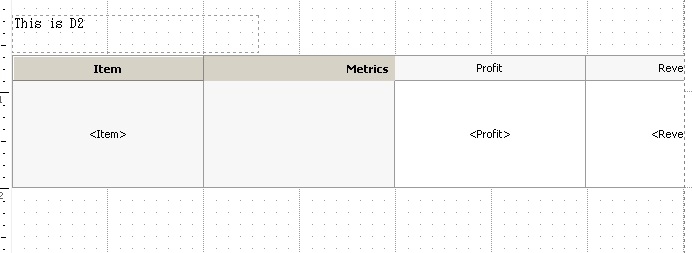
3. Create a dashboard named D2. Place the R2 report as a grid and a text message to easily recognize that this is the destination document as follows:
ka04W00000148xdQAA_0EM4400000026Za.jpeg


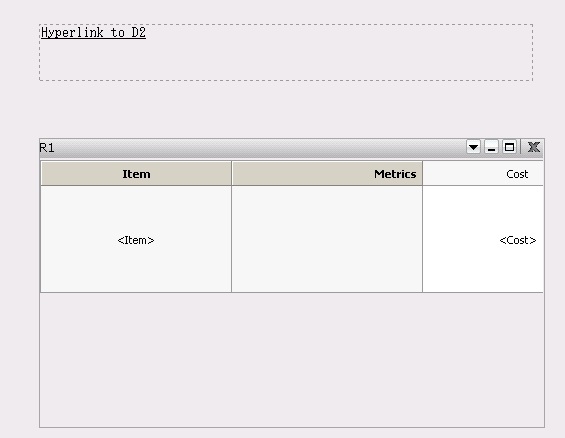
4. Create a dashboard named D1. Place the R1 report as a grid and a hyperlink to the D2 document as shown below:
ka04W00000148xdQAA_0EM4400000026Zm.jpeg

 
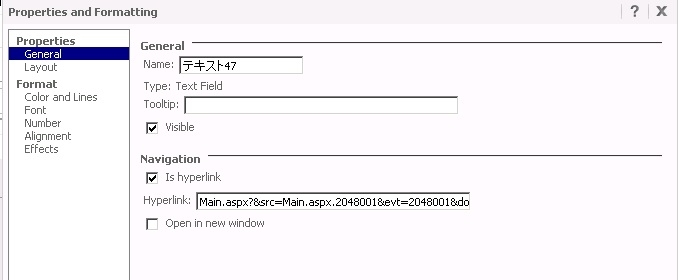
5. As for the hyperlink definition, set as follows
ka04W00000148xdQAA_0EM4400000026Zb.jpeg

Sample Code/Error
Main.aspx?&src=Main.aspx.2048001&evt=2048001&documentID=’document ID of D2’&reportViewMode=1& originMessageID={&DOCUMENTMESSAGEID} 
 
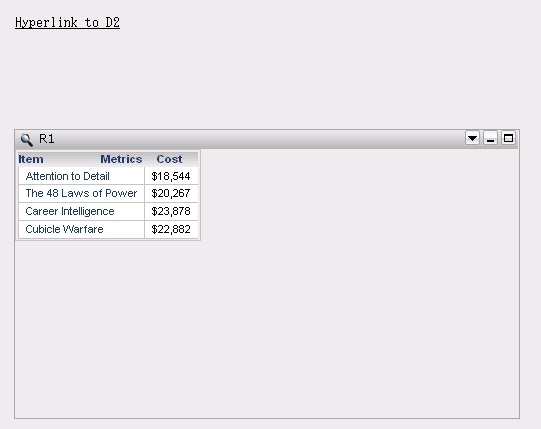
6. After answering all the prompts in D1, click the hyperlink and all the elements are passed to D2 as follows
 

ka04W00000148xdQAA_0EM4400000026Zd.jpeg


Comment

0 comments

Details

Knowledge Article

Published:

May 26, 2017

Last Updated:

June 29, 2022