EducationSoftwareStrategy.com
StrategyCommunity

Knowledge Base

Product

Community

Knowledge Base

TopicsBrowse ArticlesDeveloper Zone

Product

Download SoftwareProduct DocumentationSecurity Hub

Education

Tutorial VideosSolution GalleryEducation courses

Community

GuidelinesGrandmastersEvents
x_social-icon_white.svglinkedin_social-icon_white.svg
Strategy logoCommunity

© Strategy Inc. All Rights Reserved.

LegalTerms of UsePrivacy Policy
  1. Home
  2. Topics

KB44421: "Error in save as (You do not have Write access to the Folder object ´Reports`)" informative message received when saving objects in a Shared Reports children folder in MicroStrategy Web 9.4.1 and above.


Community Admin

• Strategy


In MicroStrategy Web Universal 9.3.0 Hotfix 4, the informative message below appears when a particular user tries to save objects into a Shared Reports children folder: "Error in save as (You do not have Write access to the Folder object 'Reports'.)"
SYMPTOM:
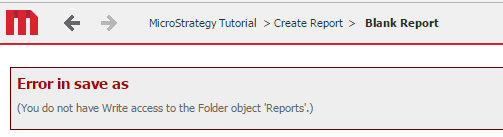
In Strategy Web 9.4.1 and above, the informative message below appears when a particular user tries to save objects into a Shared Reports children folder: 

ka04W000001MKvtQAG_0EM440000002HnQ.png


Error in save as
(You do not have Write access to the Folder object 'Reports'.)
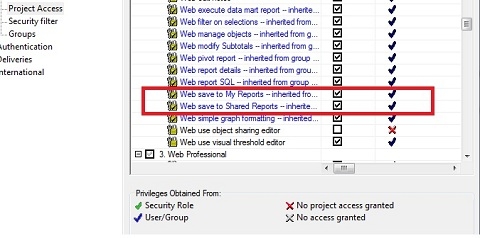
 
The same user is able to save objects into the Public Objects > Reports folder in Strategy Desktop. Also, this user has all privileges which are necessary to perform this action, including the Web save to My Reports and Web save to Shared Reports privileges, as shown:

ka04W000001MKvtQAG_0EM4400000026Zc.jpeg

 
This issue started happening after clicking on the Update ACLs For Reports option, available in Strategy Desktop by clicking on Project Configuration > Project Definition > Security, under Security model,  as shown: 

ka04W000001MKvtQAG_0EM4400000026Ze.png

 
It is described in the Strategy technical note below an issue that is quite similar; however, at this time, the affected user's group was listed in the Parent folder ACL list:

  • KB42744: "Error in save as (You do not have Write access to the Folder object "Reports".)" error appears when trying to save into the Shared Reports folder in MicroStrategy Web 9.x.

 
CAUSE:
Upon reviewing the Public Folder Security options, it was found that subfolders were not inheriting the parent's ACL configuration; therefore, the newer Shared Reports children folders had different permissions.
 
ACTION:
Follow the steps below to avoid this scenario and propagate the parent's folder ACL configuration to its subfolders:
1) In Strategy Desktop, right mouse click on the Public Objects > Reports folder and select Properties
2) Click on Security, so enable the options:
   a) Apply changes in permissions to all children objects. (This option is intended to propagate all permissions changes to the children folders)  
   b) Overwrite children’s access control lists. (This option is intended to overwrite the ACL from all children folders)
   c) Recursively. (This option is intended to propagate changes on the parent's folders to be applied on all children folders recursively, up to the latest level from top to down)
 
NOTE: For further information regarding the Update ACL For Reports option, refer to the Strategy technical note:

  • KB12546: Which objects are modified by clicking ’Update ACL For Reports’?

Comment

0 comments

Details

Knowledge Article

Published:

April 3, 2017

Last Updated:

April 3, 2017