SYMPTOM
When executing a report against a DB Instance which uses DBMS object "Microsoft SQL Server 2008", the following error occurs:

Error: QueryEngine encountered error: Execute Query failed.
Error type: Odbc error. Odbc operation attempted: SQLExecDirect. Incorrect syntax near '<'. Connection String:
…
CAUSE
There are invalid characters existing in the column name in the SQL Server database. For each DBMS object, we have the VLDB setting to deal with some invalid characters.
In Strategy pre-9.4.0 product environment, this VLDB setting is set to deal with invalid characters "[]" for DBMS object "Microsoft SQL Server 2008". While in Strategy 9.4, we are going to have the following invalid characters all be handled:
Sample Code/Error
[]~`!@#$%^&*()\?|/space;{}-+=:'"<>,
But it fails to update the DBMS object "Microsoft SQL Server 2008" in Strategy 9.4 due to MD Update defect.
ACTION
This is a known issue logged as Strategy defect. Strategy will continue to investigate and post updates as soon as they are available.
WORKAROUND
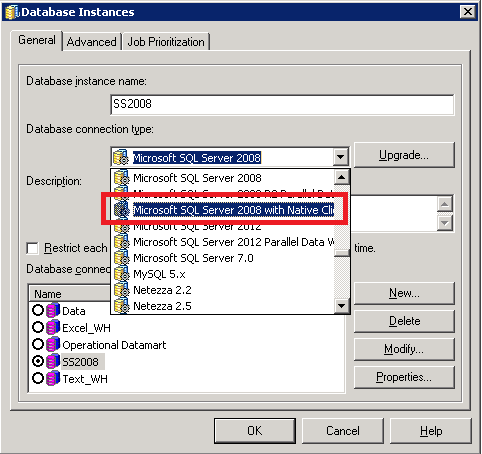
After MD Update, manually change the DBMS object to "Microsoft SQL Server 2008 and 2008 R2" or "Microsoft SQL Server 2008 with Native Client Driver" from "Microsoft SQL Server 2008" in the DB Instance editor, as shown below: