With Strategy, SQL optimization is performed, by default, across passes corresponding to different elements of a Custom group when possible. Passes that hit the same fact table across different elements of a custom group are merged provided that they satisfy certain conditions. For example, the before and after SQL that is generated for a report (Fig 2) containing the Custom Group “CG Categories” (Fig 1) and Revenue metric is shown in Table 1. As seen in Table 1, the SQL corresponding to Strategy with the optimization only accesses the fact table once as the passes are merged and is therefore expected to deliver improved performance in the case of large fact tables.

Fig 1: Custom Group definition of Custom Group "Categories"

Fig 2: Report result Custom Group report
Table 1: Custom Group SQL Optimization
select sum(a11.TOT_DOLLAR_SALES) Revenue from YR_CATEGORY_SLS a11 where a11.CATEGORY_ID in (1) select sum(a11.TOT_DOLLAR_SALES) Revenue from YR_CATEGORY_SLS a11 where a11.CATEGORY_ID in (2) | select sum((Case when a11.CATEGORY_ID in (1) then a11.TOT_DOLLAR_SALES else NULL end)) Revenue, sum((Case when a11.CATEGORY_ID in (2) then a11.TOT_DOLLAR_SALES else NULL end)) Revenue1 into #ZZOP00 from YR_CATEGORY_SLS a11 where (a11.CATEGORY_ID in (1) or a11.CATEGORY_ID in (2)) select pa01.Revenue WJXBFS1 from #ZZOP00 pa01 select pa01.Revenue1 WJXBFS1 from #ZZOP00 pa01 |
As referenced earlier, the passes are merged only if certain conditions are met. The conditions are as follows:
1) The passes differ by only their where clause.
2) The functions that are used in the pass are limited to the below list.:
Function List = {Plus, Minus, Times, Divide, UnaryMinus, Sum, Count, Avg, Min and Max}
This function list was determined after performing a number of exhaustive tests that determined that this subset of functions allows for safe SQL to be generated when multiple passes are combined with syntax such as ‘sum((Case when a11.CATEGORY_ID in (1) then a11.TOT_DOLLAR_SALES else NULL end))’ as shown in Table 1.
In case the passes have a function which includes other functions other than those in the list as in the below case where the metric M01 (Fig 3) uses the ‘IF’ function. In this situation the passes are not merged for ‘CG Report 2’ (Fig 4) as seen in the corresponding SQL shown in Table 2.
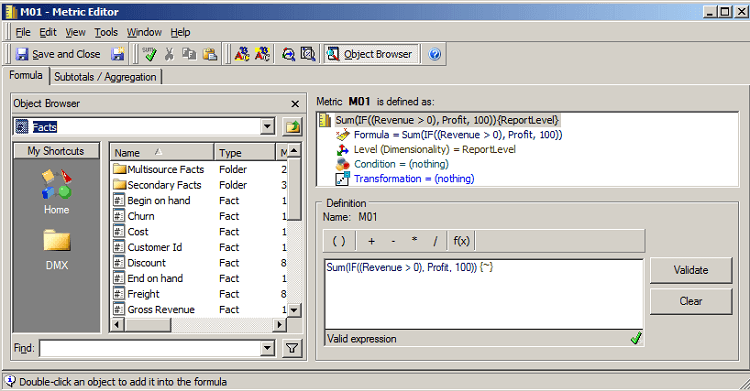
Fig 3: Definition of Metric M01

Fig 4: A report consisting of the Custom Group "Categories" and the metric "M01"
Table 2: SQL for second Custom Group Report
select sum((Case when a11.TOT_DOLLAR_SALES > 0.0 then (a11.TOT_DOLLAR_SALES - a11.TOT_COST) else 100.0 end)) WJXBFS1
from YR_CATEGORY_SLS a11
where a11.CATEGORY_ID in (1)
select sum((Case when a11.TOT_DOLLAR_SALES > 0.0 then (a11.TOT_DOLLAR_SALES - a11.TOT_COST) else 100.0 end)) WJXBFS1
from YR_CATEGORY_SLS a11
where a11.CATEGORY_ID in (2)
