EducationSoftwareStrategy.com
StrategyCommunity

Knowledge Base

Product

Community

Knowledge Base

TopicsBrowse ArticlesDeveloper Zone

Product

Download SoftwareProduct DocumentationSecurity Hub

Education

Tutorial VideosSolution GalleryEducation courses

Community

GuidelinesGrandmastersEvents
x_social-icon_white.svglinkedin_social-icon_white.svg
Strategy logoCommunity

© Strategy Inc. All Rights Reserved.

LegalTerms of UsePrivacy Policy
  1. Home
  2. Topics

KB44466: "Attribute xxxxx does not have a ID form associated with it. Please add a ID form." message appears in Freeform SQL Editor when defining freeform SQL report in MciroStrategy 9.x.


Stefan Zepeda

Salesforce Solutions Architect • Strategy


"Attribute xxxxx does not have a ID form associated with it. Please add a ID form." message appears in Freeform SQL Editor when defining freeform SQL report in MciroStrategy 9.x

SYMPTOM:
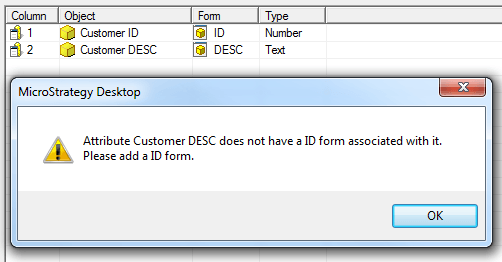
 After defining the SQL and objects in the Freeform SQL report editor, clicking 'OK' results in the following error:
ka02R000000kcbdQAA_0EM440000002Cgi.png

 
CAUSE:
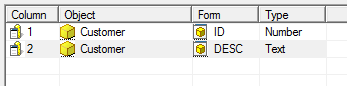
Each Strategy attribute object must have an ID form. In the above example, the object naming convention is incorrect. If two attribute forms are to be created for a given attribute, the Object name must match for each attribute form column. As it stands in the above example, two different attributes would be created, 'Customer ID' and 'Customer DESC'. However, there is no ID form associated with the 'Customer DESC' attribute and, therefore, the error is thrown.
 
ACTION:
 
Create an ID form for the Attribute in question, or change the naming so that it matches the intended ID form.
ka02R000000kcbdQAA_0EM440000002Cgh.png


Comment

0 comments

Details

Knowledge Article

Published:

April 11, 2017

Last Updated:

April 11, 2017