In Strategy 9.3.x the following error message appears "You do not have Execute access to the Metric Object 'xxx' Error in the method of processing of the component: ResolutionServer...", when executing a report in Web, in which a prompt needs to be answered including objects to which the user has no execute rights.
STEPS TO REPRODUCE:
1. Create a filter including a prompt with a predefined list of metrics (including the Cost metric):
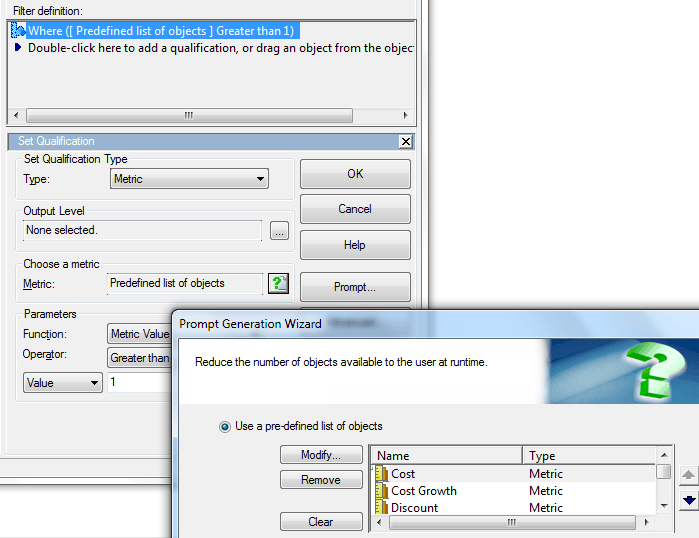
2. Create an object prompt with several filters including the one created in step 1.
3. Create a report with one attribute and several metrics and add the object prompt from step 2 into the report filter.
4. Change the security on the Cost metric adding user ‘demo’ with a custom ACL, not giving him the execute permission:

5. Execute the report from Web as the ‘demo’ user, choosing the filter created in step 1 when prompted and then when prompted again for the list of metrics - NOTE: the Cost metric will not appear as expected! - choose any metric, and the following error will appear:
Your request could not be processed. Please try again. If problem persists, contact the Administrator.

You do not have Execute access to the Metric object "Cost". Error in Process method of Component: ResolutionServer, Project Strategy Tutorial,...
