SYMPTOM:
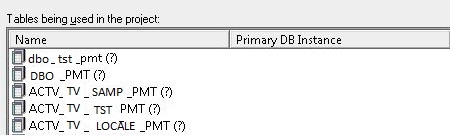
"The table 'xxx' was not found in the Warehouse Catalog" error message appears when updating the table structure in Warehouse Catalog against a Greenplum database if the table is in all upper case.

Sample Code/Error
The table 'xxx' was not found in the warehouse catalog. Therefore, the table structure cannot be read or updated.
CAUSE:
Queries against Greenplum databases can only retrieve data when querying table names in lower case since all tables are stored in lower casing. If the table name is queried in upper casing, results will not return when directly querying SQL against the database in the front end applications. When updating the structure in Warehouse Catalog, an error will appear that the table cannot be found.
ACTION:
There can be two solutions:
1. Change all the tables stored in the project to lower case.
i.e. ACCT_PMT will need to be changed to acct_pmt
2. Modify the Read SQL statements that retrieve information to lower case the query for the table name as shown below:
(lower(#TABLE_LIST#))
