SYMPTOM:
In the Strategy Tutorial project, copy a smart metric and notice that the new metric is still a smart metric;
For example, right mouse click the metric “Discount %”, select Copy, Paste and notice it is smart metric enabled.
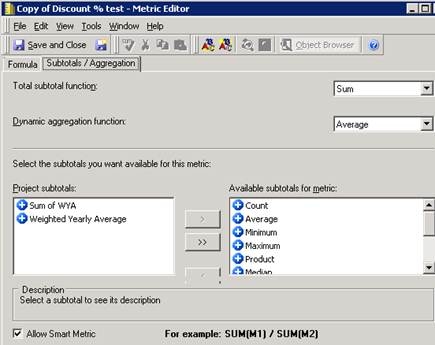
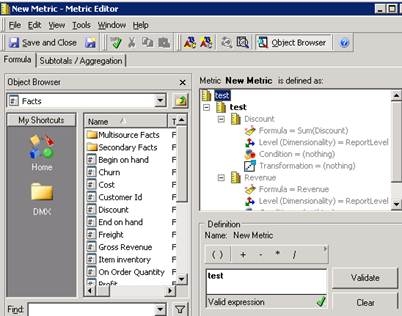
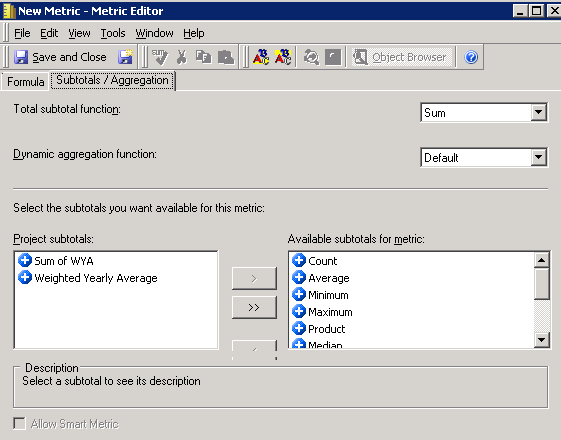
For example, “test” is a smart metric defined same as “Discount %” with the definition of "(Discount / Revenue)". Build a new metric called “New Metric”, and put the test in the formula definition, and notice the smart metric is grayed out.
CAUSE:
It’s the designed behavior that when a metric is defined by only one component, it will be non-smart metric. The “smart” means that Strategy SQL Engine will calculate the components separately and Analytical Engine will do the final calculation with the components. Therefore, “smart” is only meaningful for metric with multiple components. That’s why the checkbox for “smart” is grayed out if only one component is found in the metric expression.
ACTION:
According to current logic, if parent metric is set to be non-smart, all of its components will be calculated non-smartly.
WORKAROUND:
Define metric with multiple components, for example, define “D” as “C*1”, C is a smart metric.
In this way, Strategy Developer will validate the expression to find two compounds: ‘C’ and ‘1’, thus the “smart” checkbox will be enabled.
