SYMPTOM:
In Strategy, create a Filter and define its Operator with the "Contains" function by filling with two different values to look for (%USA% or %Web%). When the report is executed no data is returned, and the expected SQL (where a11.[COUNTRY_NAME] like '%USA% ‘ or ‘%Web%'”) is not achieved.

Notice in the SQL view, the filter is interpreted to below:
select a11.[COUNTRY_ID] AS COUNTRY_ID,
a11.[COUNTRY_NAME] AS CUST_COUNTRY_DESC0
from [LU_COUNTRY] a11
where a11.[COUNTRY_NAME] like '%%USA% or %Web%%'
CAUSE:
This is working as designed.
Currently Strategy doesn’t have support for “Like any” format.
The expected syntax (“where a11. like '%USA% ‘ or ‘%Web%'”) is not valid SQL syntax, no database will support such syntax – the “Like” operator can only accept one pattern.
ACTION:
Create multiple filter expressions with OR operator as shown below:
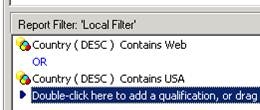
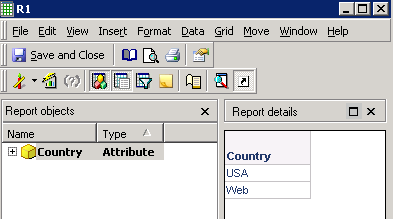
Notice in the SQL view, the filter is interpreted to below:
select a11.[COUNTRY_ID] AS COUNTRY_ID,
a11.[COUNTRY_NAME] AS CUST_COUNTRY_DESC0
from [LU_COUNTRY] a11
where (a11.[COUNTRY_NAME] like '%USA%'
or a11.[COUNTRY_NAME] like '%Web%')
Refer to the article below to take advantage of the command manager script:
KB43225 --- How to create a shortcut to Filter in Strategy Command Manager
