EducationSoftwareStrategy.com
StrategyCommunity

Knowledge Base

Product

Community

Knowledge Base

TopicsBrowse ArticlesDeveloper Zone

Product

Download SoftwareProduct DocumentationSecurity Hub

Education

Tutorial VideosSolution GalleryEducation courses

Community

GuidelinesGrandmastersEvents
x_social-icon_white.svglinkedin_social-icon_white.svg
Strategy logoCommunity

© Strategy Inc. All Rights Reserved.

LegalTerms of UsePrivacy Policy
  1. Home
  2. Topics

KB44492: Edit Links does not answer dynamically when the attribute element contains a double space and linking from Express Mode in MicroStrategy Web


Community Admin

• Strategy


Edit Links does not answer dynamically when the attribute element contains a double space and linking from Express Mode in MicroStrategy Web 9.4.1 and 10.x.

SYMPTOM:
A user has a document with a grid.  The attribute in the grid is set to link to a prompted report and the answer is passed dynamically.  When using Express Mode in Strategy Web 9.4.1 and Presentation Mode in 10.x, if the attribute element contains a double space in the name, the answer will not be passed dynamically to the linked document.  This only happens in Express Mode and only for the element with the double space.  All other attributes pass the answer correctly to the linked document. 
 
STEPS TO REPRODUCE:

  • In the Tutorial Data Warehouse, add an element to LU_REGION with a double space in between the first and second word, like shown below.
    Example: Test  Space
ka04W000000OgHwQAK_0EM4400000026Yj.png
  • Add the attribute Region to a report.
  • Create another report with attribute Region and a prompt on Region.
  • Create a document add the first report, without the prompt, as a dataset.
  • In Editable mode, right click on the attribute and go to Edit Links.  
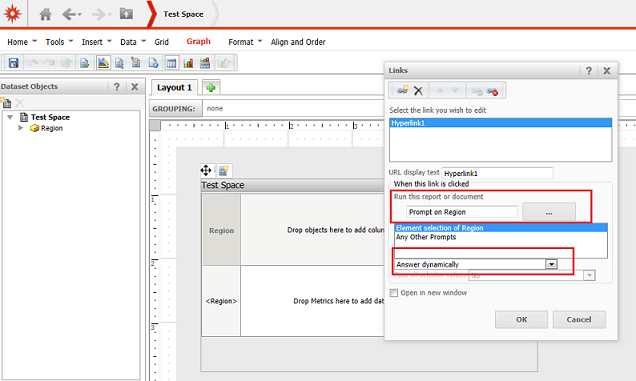
  • Run the report with the prompt and select to answer dynamically like shown below.
ka04W000000OgHwQAK_0EM4400000026Yo.png
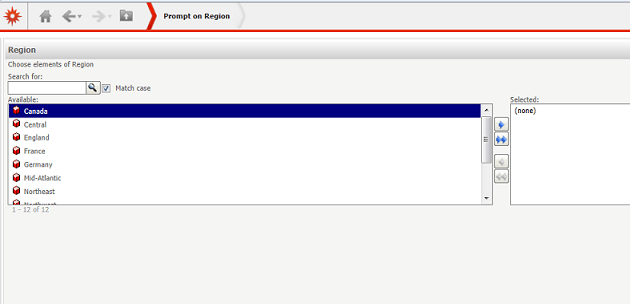
  • In Express Mode, observe that clicking on the attribute element with the double space, it does not answer dynamically.  Instead the user is prompted.  All other attribute elements in Express Mode answer dynamically. This also only happens in Express Mode.  All other modes correctly pass the attribute element.
ka04W000000OgHwQAK_0EM4400000026Ym.png


CAUSE:
This is a known issue in Strategy Web 9.4.1 and 10.x.
 
ACTION:
Strategy will continue to investigate and post updates as soon as they are available.
 
WORKAROUND:

  1. Take out the extra space in the attribute element name in the data warehouse.
  2. Use any mode except Express Mode.

Comment

0 comments

Details

Knowledge Article

Published:

June 15, 2017

Last Updated:

June 15, 2017