SYMPTOM:
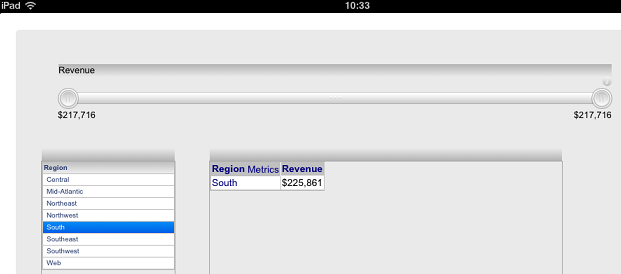
In a document, a grid has an attribute and a metric. The grid is targeted by a grid selector and a metric slider selector. When users make selection on grid selector in Strategy Web 9.3.1, the value range of the metric slider changes accordingly. However, on iPad with Strategy Mobile 9.3.1, the value range of the metric slider keeps the same when the grid selector answer is changed, as shown below:

STEPS TO REPRODUCE:
Follow the steps below to reproduce the issue with Strategy Tutorial project:
1. Create a report with "Region" and "Revenue".
2. Create a document against the above report.
3. Insert a grid with "Region" and "Revenue".
4. Insert a grid with "Region" targeting the grid created in step3.
5. Insert a metric slider selector on "Revenue". Make the selector target the grid created in step3.
6. Run the document in web and make selections on the grid selector. Note that the range of the metric slider changes accordingly.
7. Run the document on iPad with Mobile 9.3.1 and make selections on the grid selector. Note that the range of the metric slider keeps the same.
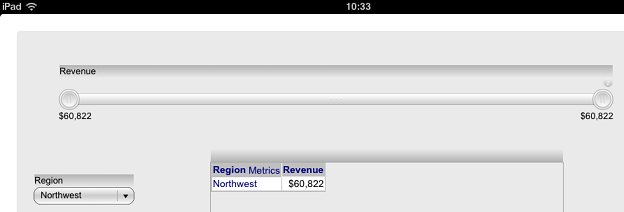
8. Modify the document design. Use a dropdown selector instead of the grid selector to target the grid. Note that the range of the metric slider changes accordingly on iPad, as shown below:

CAUSE:
This is a known issue in Strategy Mobile 9.3.1 for iPad.
ACTION:
Contact Strategy Technical Support for the latest status of the issue.
WORKAROUND:
Use a dropdown selector instead of the grid selector to target the grid.
