EducationSoftwareStrategy.com
StrategyCommunity

Knowledge Base

Product

Community

Knowledge Base

TopicsBrowse ArticlesDeveloper Zone

Product

Download SoftwareProduct DocumentationSecurity Hub

Education

Tutorial VideosSolution GalleryEducation courses

Community

GuidelinesGrandmastersEvents
x_social-icon_white.svglinkedin_social-icon_white.svg
Strategy logoCommunity

© Strategy Inc. All Rights Reserved.

LegalTerms of UsePrivacy Policy
  1. Home
  2. Topics

KB44517: System Manager is able to execute encrypted command script without prompting for password in MicroStrategy 9.4.x-10.x


Community Admin

• Strategy


This knowledge base article explains why System Manager is able to execute encrypted command script without prompting for password in MicroStrategy 9.4.x-10.x

SYMPTOM:
System Manager is able to execute encrypted command script without prompting for password in Strategy 9.4.x-10.x.
 
STEPS TO REPRODUCE:
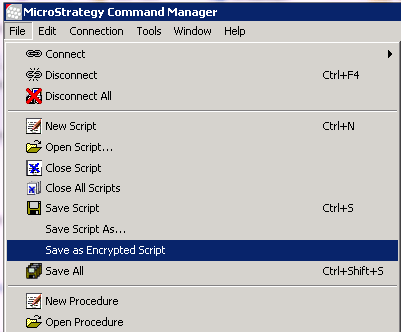
  1. Create a command script in Command Manager and save it as encrypted.
ka04W000000Oeh0QAC_0EM4400000029XK.png
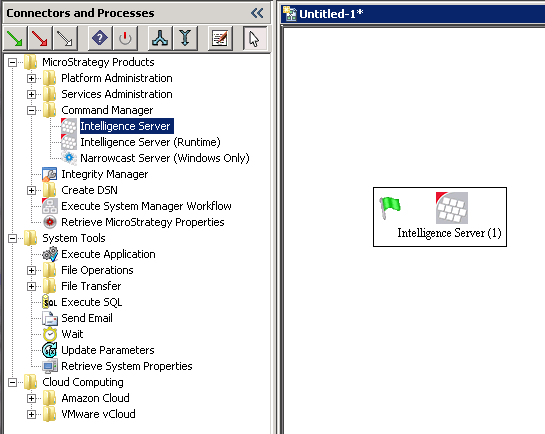
  • Open System Manager, and then add Command Manager->Intelligence Server into workflow window.
ka04W000000Oeh0QAC_0EM4400000029XO.png
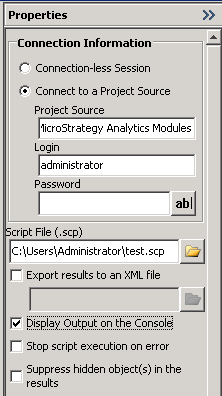
  • Input the parameters of Intelligence Server and add the command script created before.
ka04W000000Oeh0QAC_0EM4400000029XQ.png
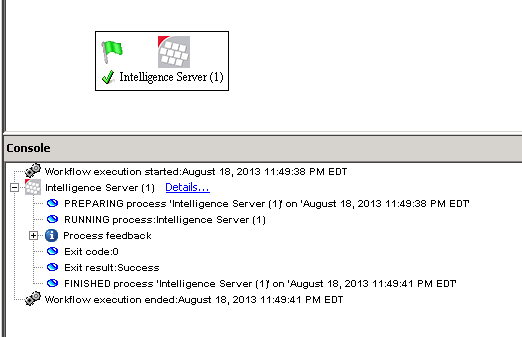
  • Run the command script. The script now runs successfully without prompting for password.
ka04W000000Oeh0QAC_0EM4400000029XV.png

CAUSE:
This is not an issue, and the behavior above is by designed. The password is to prevent other users to edit the script but user who created it should be able to execute an encrypted script without providing password. This encrypted file can then be used with the command line using the –connectionless parameter. The command line will recognize the encrypted file and will be able to execute it (without the need for password).


Comment

0 comments

Details

Knowledge Article

Published:

June 7, 2017

Last Updated:

June 7, 2017