EducationSoftwareStrategy.com
StrategyCommunity

Knowledge Base

Product

Community

Knowledge Base

TopicsBrowse ArticlesDeveloper Zone

Product

Download SoftwareProduct DocumentationSecurity Hub

Education

Tutorial VideosSolution GalleryEducation courses

Community

GuidelinesGrandmastersEvents
x_social-icon_white.svglinkedin_social-icon_white.svg
Strategy logoCommunity

© Strategy Inc. All Rights Reserved.

LegalTerms of UsePrivacy Policy
  1. Home
  2. Topics

KB44518: Why do settings in "Enforce Password Complexity" under "Password Policy" need to be applied when a LDAP account is linked to a newly created user in MicroStrategy 9.3.x?


Community Admin

• Strategy


This KB article describes why settings in "Enforce Password Complexity" under "Password Policy" need to be applied when a LDAP account is linked to a newly created user in MicroStrategy 9.3.x.

SYMPTOM:
To connect LDAP users and groups to users and groups in Strategy, one can either import the LDAP users and groups into the Strategy metadata or simply create a link between users and groups in the LDAP directory and in Strategy. If LDAP user is connected by linking to a newly created user in Strategy, settings in "Enforce Password Complexity" under "Strategy Intelligence Server Configuration" need to be complied when specifying password for the user.
 
STEPS TO REPRODUCE:
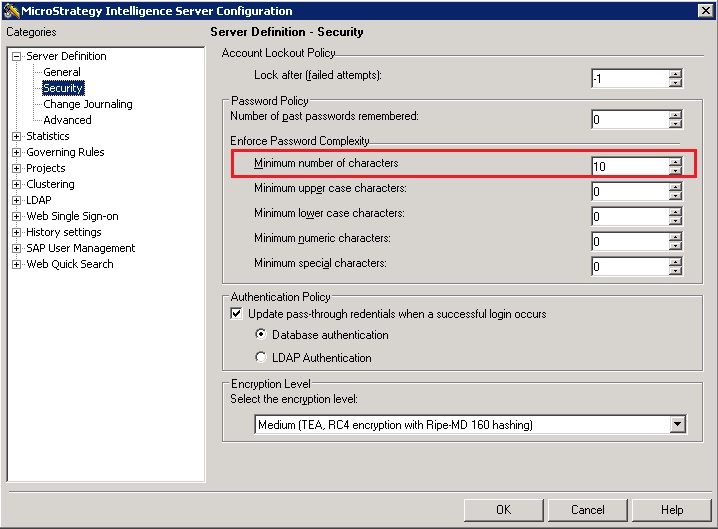
  • Set "Minimum number of characters" under "Enforce Password Complexity" as '10'
ka04W000000OgzoQAC_0EM4400000029XI.png
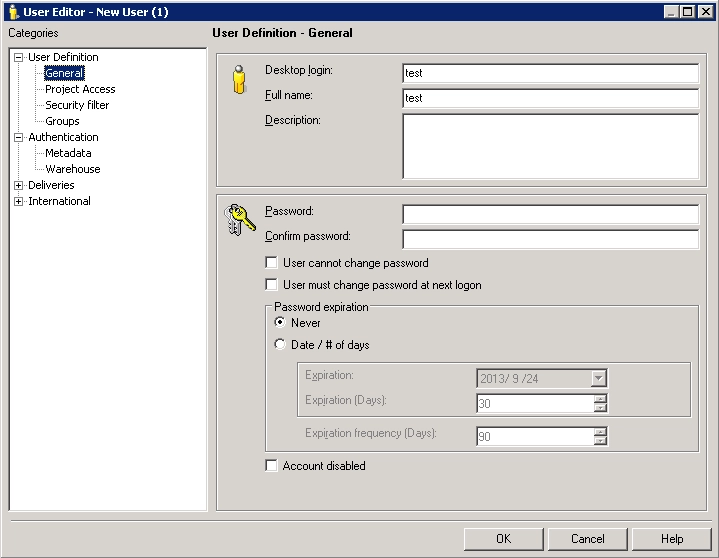
  • ​Create a new user in User Manager and leave the password as blank.
ka04W000000OgzoQAC_0EM4400000029XG.png
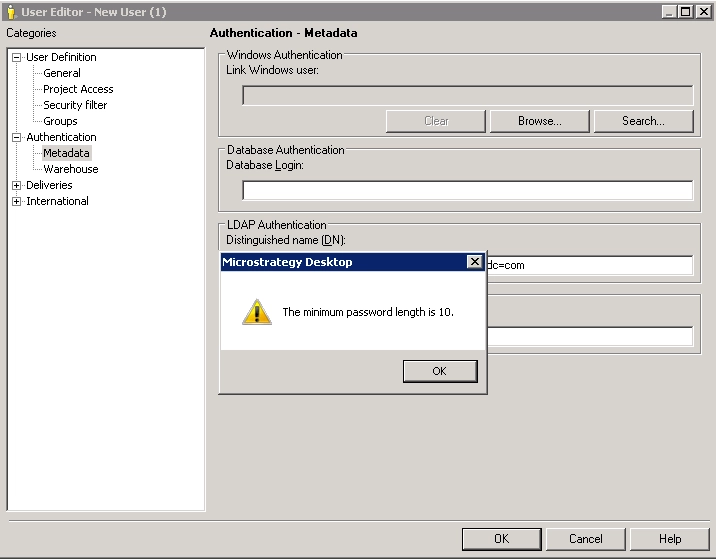
  • Specify distinguished name under LDAP authentication.
  • Click "OK" and message "The minimum password length is 10" pops up.
ka04W000000OgzoQAC_0EM4400000029XM.png

CAUSE:
This is not an issue. When a LDAP user is linked to a user (either an existing or a newly created user) in Strategy, one can login to the project source either using the LDAP account when Authentication mode is "use LDAP Authentication" or using user name and password when Authentication mode is "Standard Authentication". So the password should comply with settings in "Enforce Password Complexity". If "Enforce Password Complexity" need to be bypassed for LDAP users, one can choose to import the LDAP user.


Comment

0 comments

Details

Knowledge Article

Published:

June 6, 2017

Last Updated:

June 6, 2017