EducationSoftwareStrategy.com
StrategyCommunity

Knowledge Base

Product

Community

Knowledge Base

TopicsBrowse ArticlesDeveloper Zone

Product

Download SoftwareProduct DocumentationSecurity Hub

Education

Tutorial VideosSolution GalleryEducation courses

Community

GuidelinesGrandmastersEvents
x_social-icon_white.svglinkedin_social-icon_white.svg
Strategy logoCommunity

© Strategy Inc. All Rights Reserved.

LegalTerms of UsePrivacy Policy
  1. Home
  2. Topics

KB44526: "Data source name not found and no default driver specified" error appears when running Warehouse Catalog in MicroStrategy Developer 9.4.x-10.x


Stefan Zepeda

Salesforce Solutions Architect • Strategy


This knowledge base article explains why "Data source name not found and no default driver specified" error appears when running Warehouse Catalog in MicroStrategy Developer 9.4.x-10.x

SYMPTOM:
"Data source name not found and no default driver specified" error appears when running Warehouse Catalog in Strategy Developer 9.4.x-10.x, as shown below:

ka02R000000kbtoQAA_0EM440000002CgO.jpeg


Unexpected Error.
Database error <>: Connect failed. Unable to connect.
Error type: Odbc error. Odbc operation attempted:
SQLDriverConnect. Data source name not found and no default driver specified.
 
CAUSE:
This error means that the Data Source Name (DSN) pointing to the warehouse database was not found on the Strategy Developer machine (if it was 2-tier) or Strategy Intelligence Server machine (if it was 3-tier connectivity). 
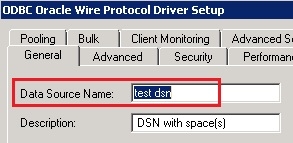
If the DSN was created correctly, one possibility is that there one or more spaces are in the DSN used as data warehouse, as shown below:

ka02R000000kbtoQAA_0EM440000002Cga.jpeg

 
ACTION:
Edit the DSN used as data warehouse, and remove the space(s) in the DSN.


Comment

0 comments

Details

Knowledge Article

Published:

June 6, 2017

Last Updated:

June 6, 2017