EducationSoftwareStrategy.com
StrategyCommunity

Knowledge Base

Product

Community

Knowledge Base

TopicsBrowse ArticlesDeveloper Zone

Product

Download SoftwareProduct DocumentationSecurity Hub

Education

Tutorial VideosSolution GalleryEducation courses

Community

GuidelinesGrandmastersEvents
x_social-icon_white.svglinkedin_social-icon_white.svg
Strategy logoCommunity

© Strategy Inc. All Rights Reserved.

LegalTerms of UsePrivacy Policy
  1. Home
  2. Topics

KB44532: Case function doesn't display in available function list but it is supported in MicroStrategy Visual Insight 9.x


Community Admin

• Strategy


Case function doesn't display in available function list but it is supported in MicroStrategy Visual Insight 9.x

SYMPTOM:
 
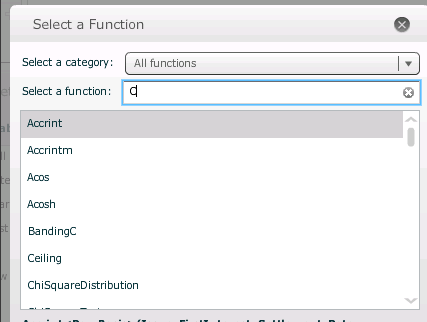
Case function does not display in available function list but it is supported in Strategy Visual Insight 9.x.
The following steps demonstrate how to reproduce the issue in tutorial project.
 
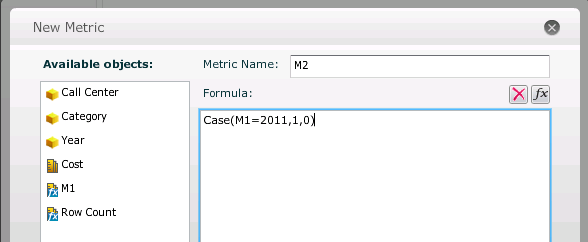
M2=Case(M1=2011,1,0)
 

  1. Create a report with Year and Cost.
  2. Create an visual insight dashboard with this report as dataset.
  3. Insert new metric "M1" with formula as shown below:
     

    M1=Max(Year@ID){~}

    .
  4. Insert new metric "M2" with formula as shown below:


ka04W000000OezFQAS_0EM4400000026Yk.png

 
The formula is correct as shown below:
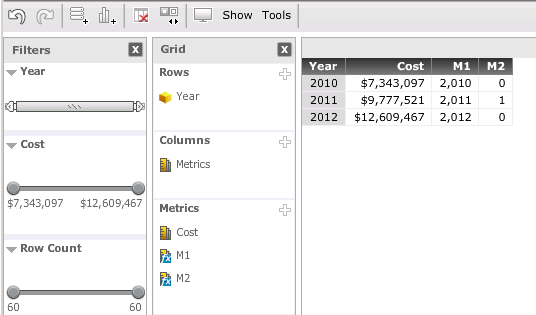
 

ka04W000000OezFQAS_0EM4400000026Yn.png


  • But Case function cannot be found in available function list as shown below:
ka04W000000OezFQAS_0EM4400000026Yp.png


CAUSE:
This is a known issue in Strategy Visual Insight 10.x
 
ACTION:
The issue has been fixed in 10.x.Please upgrade to take advantage of the fix.


Comment

0 comments

Details

Knowledge Article

Published:

June 20, 2017

Last Updated:

June 20, 2017