EducationSoftwareStrategy.com
StrategyCommunity

Knowledge Base

Product

Community

Knowledge Base

TopicsBrowse ArticlesDeveloper Zone

Product

Download SoftwareProduct DocumentationSecurity Hub

Education

Tutorial VideosSolution GalleryEducation courses

Community

GuidelinesGrandmastersEvents
x_social-icon_white.svglinkedin_social-icon_white.svg
Strategy logoCommunity

© Strategy Inc. All Rights Reserved.

LegalTerms of UsePrivacy Policy
  1. Home
  2. Topics

KB44553: A report with multiple page-bys will create combination pages that return no data in MicroStrategy Office


Community Admin

• Strategy


A report with multiple page-bys will create combination pages that return no data in MicroStrategy Office

SYMPTOM:
 
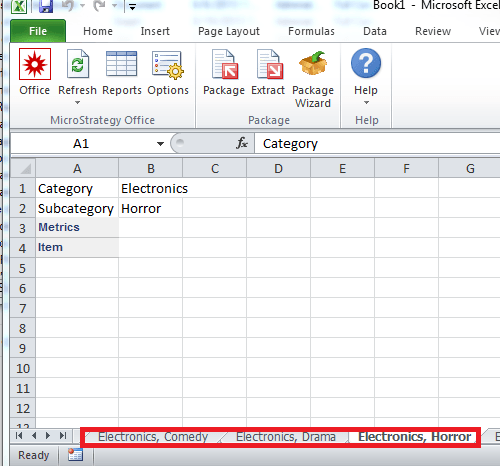
A user runs a report with more than one page-by through the Strategy Office plug-in with the options to Display all pages and to Use page layout or group name as the Worksheet name. Even when the page-by's are related as parent-child, Strategy Office 9.3.0 will create incorrect combinations of elements from the two attributes where there is no relationship, thus no data is returned for that Excel tab, like shown below.
 

ka04W000000Oe0GQAS_0EM4400000026YM.png

Note: Comedy, Drama, and Horror are not subcategories for the Electronics Category.
 
 
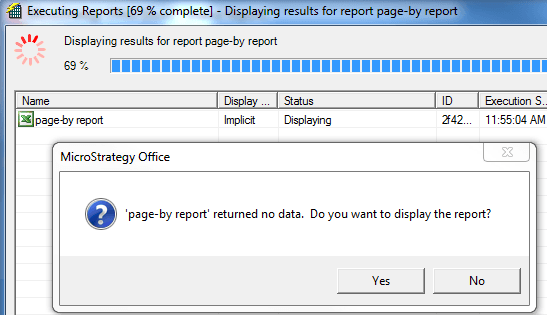
The user will get multiple pop-up messages for these pages that have no data during the execution of the report, as shown below:
ka04W000000Oe0GQAS_0EM4400000026YE.png


'report name' returned no data. Do you want to display the report?


STEPS TO REPRODUCE:

  • Create a report with Category and Subcategory in the page-bys and Item and a metric on the grid.
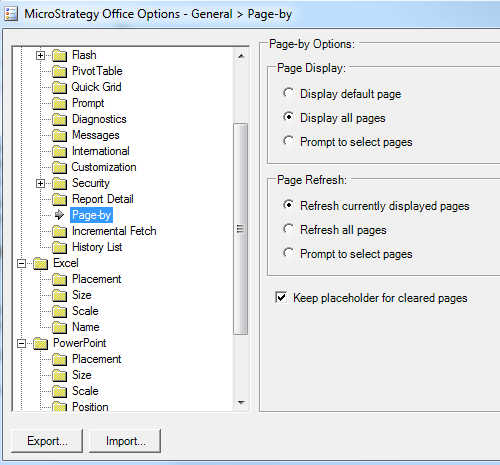
  • In the Office Configuration page, enable "Display all pages" under Page-by so that it will display all page-by selections, as shown below:
ka04W000000Oe0GQAS_0EM4400000026YW.png
  •  
    Also, enable "Use page, layout, or group name" under Name for Excel in the Office Configuration page so that the name of the attributes will display in the Excel tabs instead of the report name, as shown below:
     
ka04W000000Oe0GQAS_0EM4400000026YG.png
  • Bring in the report created in Step 1 in Microsoft Excel using the Strategy Office 9.3.0 plug-in.
  • The Excel sheet will bring in the data correctly for the correct combinations of Category and Subcategory, as shown below:
ka04W000000Oe0GQAS_0EM4400000026YI.png
  • Notice: Action is a subcategory for the Movie category.
  • At the same time, it will also bring in incorrect combinations of Category and Subcategory and the Excel sheet will be blank, as shown below:
ka04W000000Oe0GQAS_0EM4400000026YM.png

 
CAUSE:
 
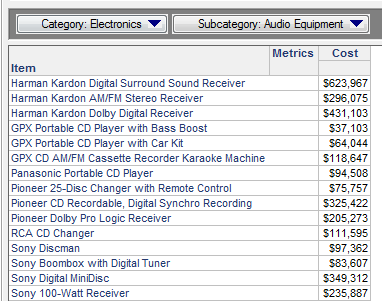
In Strategy Desktop or Web 9.3.0, the expected behavior can be confirmed, that once Category is selected in the first page-by, the second page by, Subcategory, is filtered by the first one as shown below:
ka04W000000Oe0GQAS_0EM4400000026YC.png

 
In Strategy Office 9.3.0, changing an element selection prior to the report execution doesn't run a query to filter the next page. However, invalid pages may be deselected prior to executing the report.
 
This is a known limitation with Strategy Office. An enhancement request has been logged to address this issue.
 
ACTION:
 
Contact Strategy Technical Support for an update on the issue.
 
WORKAROUND:
 
If possible, first make sure the Strategy Web Preference for Export Reports > Excel with formatting options > Allow Strategy Office to refresh Reports after exporting is enabled. Then export the report from Strategy Web with formatting to display the correct combinations of attributes for the page-bys.


Comment

0 comments

Details

Knowledge Article

Published:

June 14, 2017

Last Updated:

June 14, 2017