EducationSoftwareStrategy.com
StrategyCommunity

Knowledge Base

Product

Community

Knowledge Base

TopicsBrowse ArticlesDeveloper Zone

Product

Download SoftwareProduct DocumentationSecurity Hub

Education

Tutorial VideosSolution GalleryEducation courses

Community

GuidelinesGrandmastersEvents
x_social-icon_white.svglinkedin_social-icon_white.svg
Strategy logoCommunity

© Strategy Inc. All Rights Reserved.

LegalTerms of UsePrivacy Policy
  1. Home
  2. Topics

KB44555: Tooltips on textboxes do not display in MicroStrategy Mobile 9.3.0.


Community Admin

• Strategy


A user configures a textbox in a document to have a tooltip display whenever the user hovers over it. If the document is executed through MicroStrategy Mobile 9.3.0, the tooltips won't display.

SYMPTOM:
A user configures a textbox in a document to have a tooltip display whenever the user hovers over it. If the document is executed through Strategy Mobile 9.3.0, the tooltips won't display.
STEPS TO REPRODUCE:
  • Create a dashboard with a textbox.
  • From the textbox properties and formatting > General, add a tooltip.
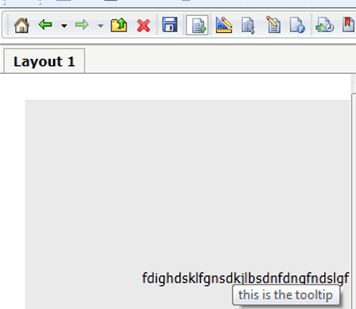
  • The tooltip will display in Strategy Web 9.3.0 upon hovering over the textbox, as shown below:
ka04W000000Of2RQAS_0EM4400000026YX.png
  • Run the dashboard in Strategy Mobile and the tooltip will not show even if tapping on the textbox or pressing and holding, as shown below:
ka04W000000Of2RQAS_0EM4400000026YV.png

 
CAUSE:
This is a known limitation with Strategy Mobile 9.3.0 caused by the fact there is no "hover over" gesture on the iPad. However, tapping or pressing and holding don't bring the tooltip out either. An enhancement request has been logged to address this issue.
 
ACTION:
Contact Strategy Technical Support for an update on the issue.


Comment

0 comments

Details

Knowledge Article

Published:

June 14, 2017

Last Updated:

June 14, 2017