EducationSoftwareStrategy.com
StrategyCommunity

Knowledge Base

Product

Community

Knowledge Base

TopicsBrowse ArticlesDeveloper Zone

Product

Download SoftwareProduct DocumentationSecurity Hub

Education

Tutorial VideosSolution GalleryEducation courses

Community

GuidelinesGrandmastersEvents
x_social-icon_white.svglinkedin_social-icon_white.svg
Strategy logoCommunity

© Strategy Inc. All Rights Reserved.

LegalTerms of UsePrivacy Policy
  1. Home
  2. Topics

KB44581: "Vertical text is not supported in this browser" message appears when trying to configure text within a report to be vertical in MicroStrategy Web 9.x


Community Admin

• Strategy


Users that try to format the text in a grid report to be vertical will encounter the error message in MicroStrategy Web 9.x.

SYMPTOM:
Users that try to format the text in a grid report to be vertical will encounter the error message shown below in Strategy Web 9.x.
 

ka04W000000OhKSQA0_0EM4400000026YO.png


Vertical text is not supported in this browser.
  
STEPS TO REPRODUCE:

  • Create a report in Strategy Web 9.x with the Year attribute and Profit metric.
  • Execute this report.
  • Right-click the header for Year and select "Advanced formatting".
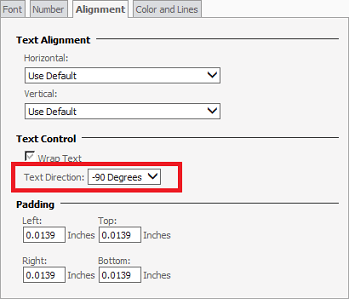
  • Select the "Alignment" tab and select "-90 Degrees" from the "Text Direction" dropdown.
     
ka04W000000OhKSQA0_0EM4400000026YJ.png
  • Click "Apply".
    Note: Users will see the error message after trying to apply these changes. 

CAUSE:
As the text explains, this is a browser rendering limitation that affects Strategy Web 9.x on IE 9, Firefox, and Chrome. IE 7 and 8 display the rotated text without problems.
 
ACTION:
Contact Strategy Technical Support for an update on this issue.


Comment

0 comments

Details

Knowledge Article

Published:

May 25, 2017

Last Updated:

May 25, 2017