EducationSoftwareStrategy.com
StrategyCommunity

Knowledge Base

Product

Community

Knowledge Base

TopicsBrowse ArticlesDeveloper Zone

Product

Download SoftwareProduct DocumentationSecurity Hub

Education

Tutorial VideosSolution GalleryEducation courses

Community

GuidelinesGrandmastersEvents
x_social-icon_white.svglinkedin_social-icon_white.svg
Strategy logoCommunity

© Strategy Inc. All Rights Reserved.

LegalTerms of UsePrivacy Policy
  1. Home
  2. Topics

KB44584: Users are being prompted for the same prompt multiple times in MicroStrategy Web 9.x.


Community Admin

• Strategy


SYMPTOM:
 
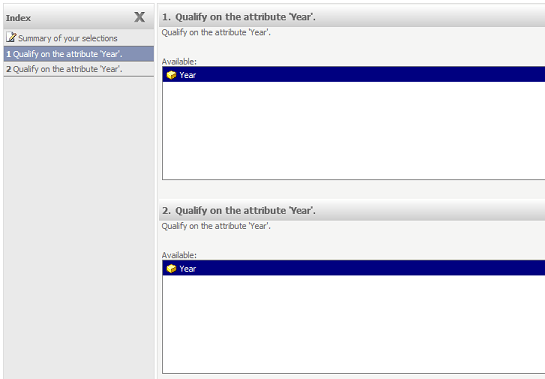
A user creates a documents with two datasets that are pulling data off of the same cube. If both reports have the same prompt on the same attribute, the expected behavior is to see the prompt only once. However in Strategy Web 9.x and Strategy Mobile 9.x, the prompt is displayed once per each time it exists within an underlying report. Below, is a sample document with the same prompt in two different datasets. The prompt shows up twice.
 

ka04W000000Od2fQAC_0EM4400000026Xt.png

 
STEPS TO REPRODUCE:

  1. Create a cube in Strategy Tutorial with the Region and Year attributes and the Cost and Profit metrics.
  2. Create a report from this cube with the Region and Year attributes and the Cost metric.
  3. Create a prompt in the view filter on Year.
    Note: It should be created with "Year" as the "Field", "Where" as the "Operator", and "Prompt for Expression" as the "Field".
  4. Create another report from this cube with the Region and Year attributes and the Profit metric.
  5. Create a prompt in this view filter on Year.
    Note: It should be created the same way as the previous prompt in step 3.
  6. Add both of these reports to a document.
  7. Run this document.
    Note: Users will see the same prompt twice.

 
CAUSE:
 
This is working as designed. When the prompt is created locally in the report view filter, there is no connection between the prompt in one report and that of the other reports. Thus a prompt created within each view filter will show up that many times in the document execution.
 
ACTION:
 
Instead of creating the prompt object on-the-fly, create a standalone prompt object. Insert this prompt object into the view filters of each report that requires it. Users executing the document will no longer be prompted multiple times for the same prompt.


Comment

0 comments

Details

Knowledge Article

Published:

June 23, 2017

Last Updated:

June 23, 2017