EducationSoftwareStrategy.com
StrategyCommunity

Knowledge Base

Product

Community

Knowledge Base

TopicsBrowse ArticlesDeveloper Zone

Product

Download SoftwareProduct DocumentationSecurity Hub

Education

Tutorial VideosSolution GalleryEducation courses

Community

GuidelinesGrandmastersEvents
x_social-icon_white.svglinkedin_social-icon_white.svg
Strategy logoCommunity

© Strategy Inc. All Rights Reserved.

LegalTerms of UsePrivacy Policy
  1. Home
  2. Topics

KB44603: Fixed row height on a grid appears differently between Web and Developer in MicroStrategy


Stefan Zepeda

Salesforce Solutions Architect • Strategy


When setting a fixed row height for a grid, the fixed height setting changes when viewed between MicroStrategy Web and Developer.

SYMPTOM:
 
When setting a fixed row height for a grid, the fixed height setting changes when viewed between Strategy Web and Developer.
 
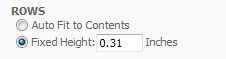
Row height in Strategy Developer
ka02R000000kY9qQAE_0EM440000002CgB.png

 
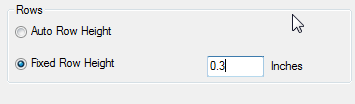
Row height in Strategy Web 

ka02R000000kY9qQAE_0EM440000002Cg6.png

 
STEPS TO REPRODUCE:

  1. Create a document from a report that has an attribute and a metric in Strategy Developer
  2. Right click on the grid, click Edit Grid.
  3. Open the "Grid" dropdown menu, click "Options".
  4. Click "Fixed" for column width, then click "Fixed row height", and set the row height to 0.3 inches, like shown below.
     
  5. Save the document
  6. Run the document in Strategy Web in Editable mode.
  7. Right click on grid, click "Resize columns and rows".
  8. See the row height is now fixed to 0.31, like shown below.

 
CAUSE:
 
This is a known issue with Strategy Web 
 
ACTION:
 
Contact Strategy Technical Support for an update on this issue.


Comment

0 comments

Details

Knowledge Article

Published:

June 9, 2017

Last Updated:

June 9, 2017